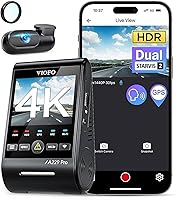
VIOFO A229 Pro Dash Cam Review: Worth It? (October 2026)
This VIOFO A229 Pro review finds a strong fit for drivers who want 4K front and 2K rear video, HDR, GPS and buffered parking options. Budget for a memory card and a separate hardwire kit if you want parking mode.
On this page (10 sections)
- The VIOFO A229 Pro at a glance
- How clear is the A229 Pro's front and rear video?
- What do HDR and STARVIS 2 mean for night driving?
- Are the parking modes useful for your car?
- How do GPS, Wi-Fi and voice control help?
- What storage and installation details matter?
- Which alternative fits your recording priorities?
- How should you set up and care for the A229 Pro?
- Who should choose the VIOFO A229 Pro?
- Is the VIOFO A229 Pro the right buy?
The VIOFO A229 Pro is a two-camera dash cam with 4K front and 2K rear recording. This VIOFO A229 Pro review is for drivers deciding whether that resolution split, HDR and parking features are worth planning around a separate memory card and hardwire kit.
The A229 Pro is the clearest fit when you want more recorded detail at the front while keeping a rear view. Choose the A229 Plus for 2K on both channels, the Vantrue N4 Pro S for an interior camera, or the A329S for a front frame rate up to 60fps.
The VIOFO A229 Pro at a glance
The A229 Pro's main distinction is 4K recording in front and 2K at the rear. Its two STARVIS 2 sensors work with HDR, and a GPS module, CPL filter and rear cable are included.
VIOFO A229 Pro: Best for detail-focused drivers

- 4K front and 2K rear recording
- Dual STARVIS 2 sensors
- Front and rear HDR
- Buffered parking modes
A dual-camera VIOFO with 4K front and 2K rear recording, HDR, GPS, voice control and three parking modes. It suits drivers who value detailed two-channel coverage and are ready to add a memory card.
Pros
- 4K front and 2K rear resolution
- HDR for front and rear
- Buffered event recording saves 15 seconds before and 30 seconds after detection
- Includes CPL filter and GPS module
Cons
- MicroSD card is not included
- Hardwire kit for parking mode is sold separately
- Rear cable is 6 m
What stands out in this VIOFO A229 Pro review?
The combination of 4K front, 2K rear and dual-channel HDR makes the A229 Pro a focused choice for two-channel coverage. GPS adds location, speed and timestamp data for playback in the VIOFO app or on a computer.
Voice commands handle selected actions without reaching for the camera. You can lock a video, take a photo, switch Wi-Fi or audio, and request a front or rear camera view; voice notifications can flag settings changes and memory card issues.
What should you plan for before buying?
The package has no microSD card, and the HK4 ACC hardwire kit is sold separately. Add the cost and effort of those items to your decision, especially if you want the camera to record when the car is parked.
The rear cable is 6 m long. Measure the route from the front camera to your rear window before installation, particularly in a long vehicle, and confirm whether the cable can follow the path you have in mind.
How clear is the A229 Pro's front and rear video?
The A229 Pro records 4K at the front and 2K at the rear, with HDR support on both channels. That gives the front camera more resolution while retaining a dedicated recording of traffic behind you.
VIOFO pairs the front IMX678 and rear IMX675 sensors with HDR to balance bright and dark areas. This can help preserve detail in scenes with mixed lighting, though distance, motion, glare, weather and camera position still affect what a recording captures.
The included CPL filter reduces reflections and glare from glass and road surfaces. Keep the windshield and lenses clean, position both cameras carefully, and review footage after installation so you can correct an obstructed view.
Resolution is only one part of choosing a camera. Our guide to 2K dash cams helps compare systems when 4K front recording may not be your priority.
What do HDR and STARVIS 2 mean for night driving?
The A229 Pro combines STARVIS 2 sensors with HDR on front and rear recordings. HDR is designed to balance highlights and shadows, which can help when bright headlights or signs appear against a dark road.
For regular night driving, front and rear HDR make the A229 Pro more compelling than a camera that records only one view with that feature. Still, no resolution or sensor can ensure every fast-moving vehicle plate will be legible in every scene.
Check that both camera views remain clear after you adjust the mounting position. If night recording is your main concern, our guide to dash cams for night vision covers more models and features to compare.
Are the parking modes useful for your car?
The A229 Pro offers auto event detection, low bitrate and time lapse parking modes. Auto event detection saves buffered footage from 15 seconds before through 30 seconds after a detected event.
A separate HK4 ACC hardwire kit is required for parking mode. Before buying it, check that the wiring approach suits your vehicle and decide whether you want a professional installation; include your vehicle's battery and parking habits in that decision.
Auto event detection suits drivers who want a clip around detected movement or impact. Low bitrate and time lapse offer other recording approaches, but review the camera instructions and power requirements before leaving the car parked for long periods.
If you want to explore another power setup, our dash cam battery pack guide explains the role a separate pack can play in parking coverage.
How do GPS, Wi-Fi and voice control help?
The A229 Pro includes quad-mode GPS and 5GHz Wi-Fi. GPS can add location, speed and timestamp data during playback, while the VIOFO app supports setup, previews and video transfer.
Use voice commands for supported actions such as locking an important clip or taking a photo. That can reduce the need to reach for the camera while driving, but set up and learn the commands while parked.
The app gives you a way to review clips on your phone. For longer sessions or file organization, a computer can be more convenient; see our guide to watching dash cam footage on a computer.
What storage and installation details matter?
The A229 Pro supports microSD cards up to 512GB, but no card is included. VIOFO recommends high-endurance cards for dash cam use, and loop recording overwrites the oldest files when storage fills.
Choose the card before installation and format it as the camera instructions direct. The camera can lock footage when it detects shaking or a collision, but copy any important clips somewhere safe rather than relying on a locked file as your only archive.
The package includes a 6 m rear cable, GPS module, car charger, CPL filter and mounting supplies. Route the cable so it does not interfere with your view or vehicle controls, then check that both cameras capture the intended road area.
For regular care, follow our instructions on formatting a dash cam SD card. Check the camera's recording status from time to time and replace a card if it begins to produce errors.
Which alternative fits your recording priorities?
Choose among these cameras by channel count, resolution and storage needs. The A229 Pro prioritizes a higher-resolution front view, while the alternatives offer even resolution, an interior view or a higher front frame rate.
| Model | Camera setup | Distinguishing feature |
|---|---|---|
| VIOFO A229 Pro | 4K front, 2K rear | HDR for both cameras |
| VIOFO A229 Plus | 2K front, 2K rear | Front recording up to 60fps |
| Vantrue N4 Pro S | 4K front, 2.5K rear, 1080P interior | Three-channel recording |
| VIOFO A329S | 4K front, 2K rear | Front recording up to 60fps |
Pick the A229 Plus if you prefer matching 2K resolution across front and rear. Its front camera can record up to 60fps, but front 1440P at that rate is unavailable with HDR enabled.
Choose the N4 Pro S if you need an interior view for passengers or the cabin. That adds a third channel and more footage to manage; see our A229 Pro vs Vantrue N4 Pro S comparison for a closer look at the two-camera versus three-camera choice.
The A329S suits drivers who want a front frame rate up to 60fps, Wi-Fi 6 and an option to use an external SSD. Its 4K at 60fps mode is unavailable with HDR enabled, so decide which matters more for your use.
How should you set up and care for the A229 Pro?
A careful setup starts with a compatible high-endurance card, a clear camera view and a rear cable route that reaches without strain. If you want parking coverage, plan for the separately sold hardwire kit before mounting the cameras.
Mount the front camera where it has a clear view through the windshield and does not obstruct your sightline. Route the rear cable neatly along the vehicle interior, attach the rear camera, and confirm both views appear as expected before relying on the system.
Connect to the VIOFO app over 5GHz Wi-Fi to adjust settings and preview footage. Check GPS information and voice controls while parked, and make a short drive to confirm the footage is recording from both cameras.
Common mistakes are easy to avoid: buying the camera without a card, assuming the standard rear cable will fit every vehicle, and expecting parking mode without its hardwire kit. Also, do not wait until you need an incident clip to learn how to lock, transfer and keep a recording.
Who should choose the VIOFO A229 Pro?
The A229 Pro suits drivers who want 4K front recording, a 2K rear camera and HDR on both channels. Its GPS, voice controls and buffered parking options add useful recording and review tools for a two-camera setup.
Skip it if you need to record inside the cabin, want matching 2K front and rear video, or specifically want 4K front recording at up to 60fps. The A229 Plus, Vantrue N4 Pro S and A329S each address one of those needs more directly.
For more premium options, browse our best high-end dash cams. Our score weighs the camera's specs and features against the needs of drivers shopping for detailed two-channel coverage.
Is the VIOFO A229 Pro the right buy?
Choose the VIOFO A229 Pro if 4K front detail, a dedicated 2K rear view and HDR on both cameras match your priorities. Choose the A229 Plus for even 2K coverage, the N4 Pro S for an interior view, or the A329S for a higher front frame rate and expanded storage choices.
Before ordering, confirm the rear cable reach, select a compatible memory card, and decide whether you need the separate hardwire kit. That preparation makes this VIOFO A229 Pro review's decision simple: buy it when its front-focused resolution split fits your driving and recording needs.
Frequently asked questions
Does the VIOFO A229 Pro record in 4K?
The A229 Pro records 4K at the front and 2K at the rear, using IMX678 and IMX675 sensors. HDR is available for both cameras.
That resolution split makes it a fit if front detail is your priority while you still want a dedicated rear view.
Does the VIOFO A229 Pro include a memory card?
No, the A229 Pro does not include a microSD card. It supports cards up to 512GB, and VIOFO recommends high-endurance cards for dash cam use.
Choose a compatible card before installation so the camera can record and loop over older footage as storage fills.
Can the VIOFO A229 Pro record while parked?
Yes, it offers auto event detection, low bitrate and time lapse parking modes. Auto event detection can save buffered footage from 15 seconds before through 30 seconds after a detected event.
A separate HK4 ACC hardwire kit is needed for parking mode.
How does the VIOFO A229 Pro compare with the A229 Plus?
The A229 Pro records 4K front and 2K rear, while the A229 Plus records 2K front and rear. Both have HDR, GPS, voice controls and three parking modes.
Compare them in our VIOFO A229 Pro vs Vantrue N4 Pro S guide for another two-camera alternative.