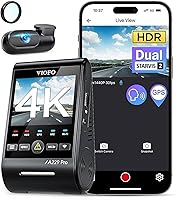
VIOFO A229 Pro vs Vantrue N4 Pro S: Which Is Better? (October 2026)
For the VIOFO A229 Pro vs Vantrue N4 Pro S, choose VIOFO for a front-and-rear system or Vantrue for front, rear and cabin coverage. If you want an interior camera but prefer VIOFO, its A229 Pro 3-Channel is another option.
On this page (9 sections)
- VIOFO A229 Pro vs Vantrue N4 Pro S: what is the main difference?
- Which dash cam suits passenger or family driving?
- How do the front and rear video specs compare?
- Which parking mode fits your setup?
- How do you set up either dash cam?
- How do Wi-Fi, GPS and daily use compare?
- How much storage can each system use?
- Which mistakes should you avoid?
- Which should you choose, VIOFO A229 Pro or Vantrue N4 Pro S?
For the VIOFO A229 Pro vs Vantrue N4 Pro S, choose VIOFO for a front-and-rear system or Vantrue for front, rear and cabin coverage. If you want an interior camera but prefer VIOFO, its A229 Pro 3-Channel is another option.
The standard VIOFO records 4K video in front and 2K in the rear. The Vantrue adds a cabin camera, recording 4K front, 2.5K rear and 1080p inside.
Both include GPS, 5GHz Wi-Fi, voice control and a supercapacitor. Think about your camera views, parked-car power plan and memory card before choosing.


VIOFO A229 Pro vs Vantrue N4 Pro S: what is the main difference?
The main difference is camera coverage: the standard VIOFO records front and rear, while the Vantrue records front, rear and cabin. Decide whether you need an interior view before comparing other features.
VIOFO's front camera records 4K and its rear camera records 2K. The dual STARVIS 2 sensors use HDR for front and rear recording.
The Vantrue records 4K in front, 2.5K at the rear and 1080p in the cabin. It uses 3 STARVIS 2 sensors with triple HDR, and the rear camera rotates 360 degrees.
A cabin view can help if you drive passengers or want footage of activity inside a parked car. If you only need road footage, an extra camera may add installation work without adding a view you’ll use.
What does VIOFO A229 Pro vs Vantrue N4 Pro mean for camera coverage?
The choice is between 2 road views with VIOFO and 3 views, including the cabin, with Vantrue. Vantrue also records at a higher rear resolution, while VIOFO offers a separate three-channel configuration.
The VIOFO A229 Pro 3-Channel records 4K front, 2K rear and 1080p inside. Infrared lights switch on in low cabin light and record black-and-white interior footage.
This VIOFO option provides cabin coverage, but its rear camera records at 2K. It supports cards up to 512GB.
The Vantrue pairs a 2.5K rear camera with support for up to 1TB. Consider the full configuration, not just the model name.
Which dash cam suits passenger or family driving?
The Vantrue N4 Pro S is a strong fit when you want to record passengers alongside the road. Its interior camera records at 1080p while the front and rear cameras record, and its rear camera can be aimed toward traffic or the trunk.
Vantrue says switching to front-and-rear mode reduces heat by 30% and saves power compared with recording all 3 channels. That mode can suit trips where you don't need an interior view.
The VIOFO A229 Pro 3-Channel is another choice for rideshare or family driving. Its infrared cabin lights can capture interior details in black and white when the cabin is dark.
Skip both three-channel setups if you don't need an interior recording and want fewer camera positions and cables. The standard VIOFO A229 Pro focuses on the road ahead and behind.
When is a 2-channel dash cam enough?
A front-and-rear system is enough when your priority is road footage and cabin events don't matter to you. The standard VIOFO A229 Pro pairs 4K front video with 2K rear video.
With fewer camera positions, installation is more straightforward than routing a system with an interior camera. VIOFO includes a 6 m rear cable, but you'll still need to plan its route through your car.
Think about the evidence you might want after an incident. If a passenger dispute or activity inside the vehicle matters, a road-only recording won't show it.
How do the front and rear video specs compare?
VIOFO records 4K front and 2K rear; Vantrue records 4K front and 2.5K rear. Resolution helps describe image detail, but it doesn't guarantee that a plate will be readable in every scene.
Both systems pair STARVIS 2 sensors with HDR. VIOFO lists HDR for the front and rear cameras, and Vantrue lists triple HDR across its 3 channels.
Vantrue says its PlatePix system supports license plate recognition in low light and backlight, including on lit streets at night at speeds up to 31 mph. VIOFO describes its HDR as helping balance highlights and shadows.
Lighting, distance, glare, motion and camera placement all affect what footage captures. See our guide to dash cams for night vision if you often drive after dark.
Which rear camera is more flexible?
The Vantrue rear camera is more flexible to aim because it rotates 360 degrees. You can point it toward traffic or the trunk area.
VIOFO's rear camera uses a fixed mount, and the included rear cable is 6 m. Vantrue includes a 20 ft rear cable, which may offer more routing room depending on your vehicle.
Measure the path from the front camera to the rear mounting point before installation. Route cables around trim and away from airbags and moving parts.
Which parking mode fits your setup?
Both systems offer buffered parking recording, but you'll need a suitable power setup to use the cameras while parked. VIOFO has 3 parking modes, while Vantrue requires a separately sold hardwire kit for parking modes.
VIOFO's Auto Event Detection stores 15 seconds before and 30 seconds after a detected event. Low Bitrate and Time Lapse provide other ways to handle parked recording and card space.
Vantrue's buffered motion and impact detection captures footage from 10 seconds before an event. All 3 cameras remain active in its parking mode.
Plan the parking setup before routing cables. Check the camera instructions and your vehicle's power requirements, and choose a hardwire option that suits how you park.
A dash cam battery pack is another power option to consider when planning for parked recording. It adds a separate component, so decide whether that setup makes sense for your car.
How do you set up either dash cam?
Start by choosing camera positions, mounting the cameras and planning power and cable routes before you rely on recordings. Install the cameras so they capture the road and, if needed, the cabin without obstructing your view.
Use the included car charger and power cable. VIOFO advises against a phone charger or cable, which may prevent the camera from turning on.
If you want parking recording, arrange the required power setup before routing trim. The VIOFO hardwire kit isn't included, and Vantrue requires a separately sold hardwire kit for its parking modes.
Neither configuration includes a microSD card. Pick a compatible high-endurance card within the camera's supported capacity.
Format it as the camera directs. The dash cam SD card formatting guide walks through that preparation.
After setup, check that each camera records the intended view and that the date and time are correct. Try the app or voice controls while the car is parked so you know how to preview, save and find footage later.
How do Wi-Fi, GPS and daily use compare?
Both systems offer 5GHz Wi-Fi, GPS and voice controls for managing recordings. These features make it easier to review or save footage, but you should learn the controls while parked rather than reaching for the camera on the road.
The VIOFO lists 12 voice commands, including taking a photo, locking a video and turning Wi-Fi or audio on and off. Vantrue also supports voice commands, including taking a photo.
GPS adds location, speed and timestamp data when reviewing clips. For longer reviews, use a computer; our guide explains how to watch dash cam footage on a computer.
Both cameras use loop recording, which replaces older footage when the card fills. They can also lock important clips.
Don't assume every event is saved automatically. Check and back up important footage before it is overwritten or the card is reused.
How much storage can each system use?
Vantrue supports cards up to 1TB, while the VIOFO configurations support up to 512GB. More capacity may be helpful when you record 3 channels or want to keep more footage on the card.
Vantrue says a 1TB card can hold more than 37 hours of continuous 4K triple-camera footage. Actual recording time varies with settings and file management, so treat that as a guide rather than a promise for your setup.
Both cameras use loop recording to reuse card space. A larger card can give you more room, but it doesn't replace the habit of saving clips you need elsewhere.
Choose a high-endurance card designed for dash cam recording, and format it as directed. Check the card periodically and replace it if the camera reports a memory problem or recording stops.
Which mistakes should you avoid?
The most common mistakes are buying the wrong channel count, skipping the power plan and assuming a card is included. Sort out coverage and setup before choosing a configuration.
Don't choose a three-channel model just because it has more cameras. If you won't use an interior view, it adds a camera and cable that may not help your driving needs.
Don't plan on parking recording without checking power requirements. VIOFO's hardwire kit and Vantrue's required hardwire kit are separate purchases, and parked recording depends on a suitable power connection.
Avoid leaving the camera pointed at the wrong area after installation. Confirm the front, rear and cabin views, then review a sample clip to make sure the framing is useful.
Which should you choose, VIOFO A229 Pro or Vantrue N4 Pro S?
For VIOFO A229 Pro vs Vantrue N4 Pro S, choose VIOFO for a simpler front-and-rear road setup, or Vantrue when cabin coverage and a rotating rear camera matter. If you want cabin recording with VIOFO, its A229 Pro 3-Channel adds that view.
Pick the standard VIOFO if you don't need to record passengers and want its 3 parking mode choices. Its 4K front and 2K rear coverage and card support up to 512GB suit drivers who want road footage from both ends.
Pick Vantrue if you need 3-channel coverage, want the rear camera to rotate, or expect to benefit from its 1TB card support. Skip it if an interior view would go unused and you prefer a less involved camera layout.
Choose the VIOFO 3-Channel if you want an infrared cabin view while staying with the A229 Pro system. For more options from that brand, see which Vantrue dash cam is best.
Frequently asked questions
Is the VIOFO A229 Pro better than the Vantrue N4 Pro S?
The VIOFO A229 Pro suits drivers who want front and rear road recording without a cabin view. The Vantrue N4 Pro S is the better fit when you need all 3 views, a rotating rear camera or support for a larger memory card.
Choose based on coverage first, then compare setup and storage.
Does the Vantrue N4 Pro S record inside the car?
Yes. The Vantrue N4 Pro S records the front, rear and cabin, with a 1080p interior view.
Its rear camera rotates 360 degrees, so you can aim it toward road traffic or the trunk area.
Can the VIOFO A229 Pro record the cabin?
The two-channel VIOFO A229 Pro records the road from the front and rear. VIOFO also offers an A229 Pro 3-Channel configuration with a 1080p interior camera and infrared lights for low-light cabin recording.
Do both dash cams support parking mode?
Both support buffered parking recording, but you'll need to plan for power while the car is off. VIOFO offers Auto Event Detection, Low Bitrate and Time Lapse modes.
Vantrue requires a separately sold hardwire kit to activate its parking modes.
Which dash cam supports a larger memory card?
The Vantrue N4 Pro S supports microSD cards up to 1TB. Both listed VIOFO A229 Pro configurations support up to 512GB.
Neither camera includes a memory card, so choose a compatible high-endurance card and format it before use.