9 Best High-End Dash Cams (October 2026)
The best high-end dash cams include the Vantrue N4 Pro S for rideshare drivers, the VIOFO A229 Pro 3-Channel for dark cabins, and the Thinkware U3000 PRO for radar parking.
On this page (7 sections)
- How we chose the best high end dash cam options
- Which high-end dash cam fits your driving needs?
- How should you choose a premium dash cam?
- How should you set up a high-end dash cam?
- What common dash cam mistakes should you avoid?
- How can you keep a premium dash cam ready?
- Which high-end dash cam should you choose?
The Vantrue N4 Pro S is the best high end dash cam for drivers who want front, rear and cabin recording. For 4K front video at 60 fps with HDR off, choose the VIOFO A329S; for radar-based parking mode, consider the Thinkware U3000 PRO.
A high-end system can mean more than a sharper front camera. Decide whether you need a cabin view, rear coverage, parked-car recording, phone access or cloud backups, then account for installation and storage before choosing.
For a wider shortlist across price tiers, see our guide to the best dash cams for everyday driving. If resolution is your main concern, our best 2K dash cams guide covers that category.
Our picks at a glance
-
1

-
2

-
3

How we chose the best high end dash cam options
The Vantrue N4 Pro S leads for drivers who want three-channel recording with a 4K front camera and buffered parking mode. We compared each option's camera views, recording modes, parking features, storage support, controls and connection needs.
This list includes systems built for different priorities, from all-around cabin coverage to remote access and high-capacity storage. A high resolution can preserve more image detail, but you should also consider whether the camera records the views you need and whether its installation fits your vehicle.
The order follows the scores assigned to each product. The score reflects how well its features match the needs behind this search, including the trade-offs of channel count, parking options and storage.
| Product | Best for | Channels | Resolution | Storage | Our score |
|---|---|---|---|---|---|
| Vantrue N4 Pro S | rideshare drivers | 3: front, rear and cabin | 4K + 2.5K + 1080p | Up to 1TB microSD | 8.6 |
| VIOFO A229 Pro 3-Channel | dark cabins | 3: front, rear and cabin | 4K + 2K + 1080p | Up to 512GB microSD | 8.5 |
| Thinkware U3000 PRO | radar parking | 2: front and rear | 4K front + 2K rear | 64GB card included; supports up to 512GB | 8.3 |
| VIOFO A329S | smooth 4K video | 2: front and rear | 4K front + 2K rear | Up to 512GB microSD or 4TB SSD | 8.2 |
| BlackVue DR770X II | remote access | 2: front and rear | 1080p front and rear | 64GB included; supports up to 1TB | 8.0 |
| Vantrue N5S 360 Dash Cam | family interiors | Up to 4 | 2.7K + 1080p + 1080p + 1440p | Up to 1TB microSD | 8.0 |
| REDTIGER F17 Elite | card-ready setups | 3: front, rear and cabin | 4K + 2.5K + 1080p | 128GB included; supports up to 512GB | 8.0 |
| BlackVue Elite 9 | cloud event backups | 2: front and rear | 4K front + 2K rear | 64GB included; supports up to 1TB | 7.8 |
| Thinkware ARC900 | screen controls | 2: front and rear | 4K front + 2K rear | 64GB card included | 7.7 |
Which high-end dash cam fits your driving needs?
The Vantrue N4 Pro S and VIOFO A229 Pro 3-Channel suit drivers who want cabin recording along with front and rear footage. If you only need to record the road, a two-camera system can be a simpler fit.
Vantrue N4 Pro S: Best for rideshare drivers
- 4K front, 2.5K rear and 1080p cabin
- Triple STARVIS 2 sensors
- 360-degree rotating rear camera
- Buffered parking mode
Three cameras cover the road ahead, behind and inside the cabin. The rear camera rotates 360 degrees, and buffered parking recording needs a separately sold hardwire kit.
Pros
- Three-channel recording
- Rear camera rotates 360 degrees
- Supports up to 1TB microSD
Cons
- Hardwire kit for parking mode is sold separately
- No memory card included
The Vantrue N4 Pro S records 4K front, 2.5K rear and 1080p cabin video with three STARVIS 2 sensors. Its rear camera rotates, so you can point it toward traffic or the trunk depending on the view you need.
Buffered motion and impact detection saves footage from 10 seconds before an event. Permanent parked-car power requires a separate hardwire kit, and the camera doesn't include a memory card.
5GHz Wi-Fi, GPS and voice control cover common phone and hands-free tasks. The camera supports microSD cards up to 1TB, useful if you plan to keep longer stretches of three-camera footage before files loop.
Choose it if you want a capable three-camera setup with flexible rear positioning. Skip it if you don't need cabin footage or want a memory card included; compare other Vantrue models in our guide to which Vantrue dash cam is best.
VIOFO A229 Pro 3-Channel: Best for dark cabins
- 4K front, 2K rear and 1080p cabin
- HDR on all three channels
- Infrared cabin lights
- Buffered parking options
HDR across all three cameras and infrared cabin lights suit drivers who want road and interior recording in varied light. Its three parking modes offer different ways to manage recordings and storage.
Pros
- HDR across all three channels
- Infrared cabin recording
- Includes GPS module and front CPL
Cons
- Hardwire kit for parking modes is sold separately
- No memory card included
The VIOFO A229 Pro 3-Channel records 4K front, 2K rear and 1080p cabin video, with HDR across all three views. Its interior camera has four infrared lights that activate when low cabin light is detected, making it a strong fit for rideshare drivers who work after dark.
Its three parking modes are Auto Event Detection, Low Bitrate and Time Lapse. Buffered event clips save 15 seconds before and 30 seconds after a detected event, but the HK4 hardwire kit is sold separately.
A front CPL filter and GPS module are included, along with 5GHz Wi-Fi and voice commands. It supports microSD cards up to 512GB, but no card is included.
Choose it if cabin visibility in low light and HDR across all views matter. Skip it if you prefer to avoid buying a compatible memory card or hardwire kit; for a side-by-side view, read our VIOFO A229 Pro vs Vantrue N4 Pro S comparison.
Thinkware U3000 PRO: Best for radar parking
- 4K front and 2K rear
- Dual STARVIS 2 sensors
- Radar wakes camera for a 20-second clip
- 64GB microSD included
Radar can wake the camera to record a 20-second clip while parked. It also includes a 64GB card, Wi-Fi and GPS tagging.
Pros
- Radar-based parking mode
- 4K front and 2K rear
- 64GB card included
Cons
- Two cameras, with no cabin channel
- 512GB maximum card capacity rather than 1TB
The Thinkware U3000 PRO pairs 4K front and 2K rear recording with radar parking mode. Radar can wake the camera for a 20-second clip, while motion and impact recording saves 10 seconds before and after an incident.
Its Wi-Fi works on both 2.4GHz and 5GHz bands. GPS tagging records speed and location, and a 64GB microSD card is included, so you can start recording without first choosing a separate card.
Thinkware also includes forward collision and lane departure warnings, along with speed camera notifications. These alerts add information while driving, but they don't replace your attention to the road.
Choose it if radar-triggered parking recording and an included card matter more than a third camera. Skip it if you need cabin footage or more storage capacity than its supported 512GB; our guide to a dash cam battery pack explains another way to think about parked-car power.
VIOFO A329S: Best for smooth 4K video
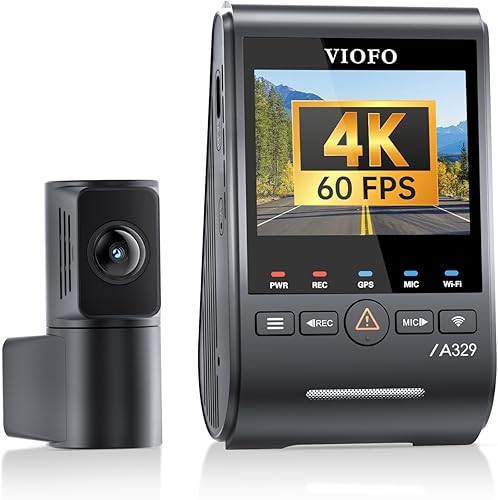
- 4K at 60 fps front with HDR off and 2K rear
- Wi-Fi 6
- Supports external SSDs up to 4TB
- Front CPL included
The front camera records 4K at 60 fps when HDR is off, while the rear records 2K. Wi-Fi 6 and optional external SSD support suit drivers who want wireless file access and more storage choices.
Pros
- 4K at 60 fps front when HDR is off
- Wi-Fi 6
- External SSD support up to 4TB
Cons
- Hardwire kit for parking mode is sold separately
- MicroSD card and SSD are not included
The VIOFO A329S records 4K front video at 60 fps when HDR is off, plus 2K rear video. With HDR on, front 4K at 60 fps isn't available, so choose between the higher frame rate and HDR according to the driving conditions you want to capture.
Wi-Fi 6 supports wireless preview and file transfer. For storage, it accepts microSD cards up to 512GB or an external SSD up to 4TB; neither is included.
Its low-power parking mode starts recording when it detects a collision. Activating that mode requires a separately sold HK4 or HK6 hardwire kit.
Choose it if smoother front footage and expanded storage options matter more than cabin coverage. Skip it if you want a card included or prefer a camera that records an interior view.
BlackVue DR770X II: Best for remote access

- Full HD front at 60 fps and rear at 30 fps
- Wi-Fi and BlackVue Cloud access
- Supports microSD cards up to 1TB
- Hardwiring required for parking mode
Cloud features include Live View, remote playback, GPS tracking and push notifications through the BlackVue app. Live uploads require a Wi-Fi hotspot or optional LTE module.
Pros
- Cloud access features
- Front recording at 60 fps
- 64GB card included
Cons
- Full HD resolution rather than 4K
- Parking mode requires hardwiring
The BlackVue DR770X II pairs Full HD front and rear recording with Wi-Fi and cloud functions. The front camera records at 60 fps and the rear at 30 fps, and a 64GB card is included.
Through the BlackVue app, cloud features include Live View, remote playback, GPS tracking and push notifications. Live uploads need a Wi-Fi hotspot or the optional CM100G LTE module, so plan for that connection if remote access is the reason you're considering it.
Parking mode records motion or impact events, with time-lapse available to use storage more efficiently. Hardwiring is required for parking recording.
Choose this model if cloud access is the priority and Full HD resolution suits your needs. Skip it if you want 4K or don't want to set up a hotspot or optional LTE connection.
Vantrue N5S 360 Dash Cam: Best for family interiors

- Four recording channels
- 2.7K front with three additional views
- Flexible 1-, 2-, 3- or 4-channel modes
- Supports up to 1TB microSD
Four cameras provide front, rear and two cabin views, with recording modes that let you use fewer channels when needed. Buffered parking recording requires a separately sold hardwire kit.
Pros
- Four camera views
- Flexible channel modes
- Supports up to 1TB microSD
Cons
- Maximum front resolution is 2.7K
- Hardwire kit for parking mode is sold separately
The Vantrue N5S records from four camera positions: a 2.7K front view, two 1080p cabin views and a 1440p rear view. You can select one, two, three or all four channels, so you can reduce the active views when you don't need full coverage.
Both cabin cameras have infrared lights. The system also supports 5GHz Wi-Fi, GPS and voice control, along with 10-second buffered motion detection in parking mode.
A separate hardwire kit is needed for parked-car recording. The camera supports microSD cards up to 1TB, sold separately, and the front camera's 2.7K resolution is lower than the 4K options in this guide.
Choose it if you need views of passengers, the rear seats and cargo area, or want flexible channel use. Skip it if your main goal is the highest available front resolution; compare alternatives in our roundup of best 3-channel dash cams.
REDTIGER F17 Elite: Best for card-ready setups

- 4K front, 2.5K rear and 1080p cabin
- Full-color night vision for front and cabin
- 128GB card included
- Touch, voice and app control
The included 128GB card lets you begin recording without buying a separate memory card. REDTIGER offers full-color night vision for the front and cabin cameras.
Pros
- 128GB card included
- Full-color night vision for front and cabin
- Touchscreen, voice and app control
Cons
- Parking mode requires a hardwire kit
- 512GB maximum card capacity rather than 1TB
The REDTIGER F17 Elite combines 4K front, 2.5K rear and 1080p cabin recording with full-color night vision for the front and cabin cameras. It includes a 128GB microSD card and supports cards up to 512GB.
For parked recording, it offers time-lapse and G-sensor event detection. A hardwire kit is required to use parking mode, so include that installation step in your plan.
The camera provides voice, touch and app controls, along with Wi-Fi 6, GPS and HDR. A cabin-camera privacy toggle lets you switch off interior recording when you don't want it active.
Choose it if you want three-channel coverage and a card ready for setup. Skip it if you need more than 512GB of microSD capacity or want to avoid a separate hardwire kit for parking mode.
BlackVue Elite 9: Best for cloud event backups

- 4K front and 2K rear
- Dual HDR and STARVIS 2 sensors
- 5GB free cloud storage
- Supports up to 1TB microSD
The included 5GB cloud storage can back up event files when cloud service is activated. Cloud features need an LTE module or Wi-Fi hotspot connection.
Pros
- 4K front and 2K rear
- 5GB free cloud storage
- Hardwire cable included
Cons
- Cloud features need an LTE module or Wi-Fi hotspot
- Two cameras, with no cabin channel
The BlackVue Elite 9 records 4K front and 2K rear video with dual HDR and STARVIS 2 sensors. Its event recording saves footage from 10 seconds before to 50 seconds after a detected event.
The system includes a hardwire cable, 64GB card and 5GB of free cloud storage. Cloud backups and alerts require cloud service activation plus an LTE module or Wi-Fi hotspot connection.
BlackVue says the camera can start recording in under one second from a complete power-off. Its power-saving parking mode wakes after an event, so consider whether you want event-triggered recording before choosing it for parked-car coverage.
Choose it if you want high-resolution front and rear recording with cloud event backup. Skip it if you need cabin footage or expect cloud access without adding a connection.
Thinkware ARC900: Best for screen controls

- 4K front and 2K rear
- 3.5-inch IPS touchscreen
- 64GB card and hardwiring cable included
- Optional LTE module support
A 3.5-inch touchscreen gives you direct access to playback and settings. LTE features require an optional module and firmware version 1.01.03 or a compatible later update.
Pros
- 3.5-inch touchscreen
- 64GB card and hardwiring cable included
- 4K front and 2K rear
Cons
- LTE module is optional
- Two cameras, with no cabin channel
The Thinkware ARC900 pairs 4K front and 2K rear cameras with a 3.5-inch IPS touchscreen. The display lets you play footage and change settings directly on the device.
It includes a 64GB microSD card and a hardwiring cable. Parking mode uses motion and impact detection, making it a practical choice if you want the cable supplied for a permanent installation.
LTE support requires an optional module and firmware version 1.01.03 or a compatible later update. With the module and required firmware, it supports live view, remote access, impact alerts and GPS tracking.
Choose the ARC900 if you want a screen, an included card and front-and-rear recording. Skip it if LTE is essential and you don't want to buy an optional module or confirm the firmware requirement first.
How should you choose a premium dash cam?
Start with the views you need, then compare parking power and file storage. Resolution matters, but a camera that misses the view you care about or can't be powered as intended won't fit your use.
How many cameras should your high-end dash cam have?
Choose a front-and-rear system if you mainly want to record what happens on the road ahead and behind. Add a cabin camera if you carry passengers, drive for rideshare or have another reason to record the interior.
Three-channel cameras add interior footage, but the extra camera creates more files and another view to position. The Vantrue N4 Pro S, VIOFO A229 Pro and REDTIGER F17 Elite each record the front, rear and cabin, while the Vantrue N5S adds a second interior view.
More channels don't automatically mean better evidence for your use. If a cabin camera would rarely help, choose a two-camera model and put your attention on its front and rear video, parking features or connection options.
Is 4K the right priority?
Choose 4K if you want more image detail in the front recording. The A329S adds 60 fps when HDR is off, while several models pair 4K front recording with a rear camera at a lower resolution.
A higher resolution can use more storage, and it doesn't guarantee that a moving license plate will be readable in every scene. Lighting, distance, speed and camera placement also affect the footage.
The A329S forces a choice between 4K at 60 fps and HDR. If glare and exposure range matter more than frame rate, select HDR rather than assuming both modes can run together.
For help comparing resolution tiers, read our guide to 1080p vs 4K dash cams.
What should you know about parking mode?
Parking modes differ in how they detect an event and how much power they need. Options in this guide include radar wake-up, buffered motion detection, impact detection and time-lapse recording.
Check the power requirement before you buy. Several models need a separate hardwire kit, while the Thinkware ARC900 includes a hardwiring cable and the Elite 9 includes a hardwire cable.
A cable in the box doesn't confirm how long a particular vehicle can power a camera while parked. Follow the brand's installation guidance, and decide whether you need event-triggered recording or continuous time-lapse coverage.
How much storage do you need?
Pick storage based on the channels you record and how often you can review or save important clips. A system recording several cameras can fill a card sooner than a front-only camera, so capacity and file management matter.
Most picks support microSD cards up to 512GB or 1TB. The Thinkware ARC900 and U3000 PRO include 64GB cards, the BlackVue DR770X II includes 64GB, and the REDTIGER F17 Elite includes 128GB.
The VIOFO A329S also supports an external SSD up to 4TB, but storage isn't included. Use a compatible, high-endurance card for ongoing dash cam recording, and learn how to format a dash cam SD card before first use.
Which controls and connections will you use?
App access can help you adjust settings or move a clip to your phone, while onboard controls can be useful if you prefer to make changes at the camera. The Thinkware ARC900 has a touchscreen; the REDTIGER F17 Elite adds touch, voice and app controls.
Wi-Fi is useful for nearby access, but cloud access has extra requirements. BlackVue's cloud features need a Wi-Fi hotspot or optional LTE module, and the Thinkware ARC900 requires an optional LTE module and the required firmware for its LTE functions.
Be specific about what “remote access” means to you. Downloading a file while near the vehicle and viewing the camera from elsewhere are different needs, and only some features work without an added connection.
How should you set up a high-end dash cam?
Set up your camera in stages: check the included parts, position the cameras, connect power, then verify a saved clip. This helps you catch wiring, framing or storage problems before you rely on the system.
Before installing, confirm which card or storage device is compatible and whether one is included. The N4 Pro S, A229 Pro and A329S don't include a memory card, while several other picks include one; format the card using the camera's instructions before regular use.
Position the front camera where it has a clear view without blocking your sightline. Place the rear and cabin cameras so they capture the intended area, then secure cables along the vehicle trim and keep them away from airbags or moving parts.
Use the supplied power cable or the brand's recommended power method. For parking features, connect a compatible hardwire kit where required, and confirm that the camera switches to its intended parking mode when the ignition is off.
After setup, record a short drive and check the front, rear and interior views if present. Confirm that the date, time, GPS data and audio settings match your preferences, and learn how the camera locks an important clip before an incident occurs.
What common dash cam mistakes should you avoid?
The most common mistakes are choosing features without checking the extra requirements and installing the system without reviewing a clip. A careful setup makes the chosen features useful day to day.
- Buying a card separately at the last minute: several models don't include one. Confirm capacity and compatibility first, especially if you plan to use multiple channels.
- Assuming 4K and HDR always run together: the A329S can't record front 4K at 60 fps with HDR enabled. Choose the mode that matches your priority.
- Expecting parking mode to work from the box: many parking features need a hardwire kit. Check whether that kit is included and whether permanent power suits your vehicle.
- Confusing nearby Wi-Fi with cloud access: Wi-Fi access at the vehicle doesn't mean you can connect from anywhere. Check the hotspot or LTE requirements for remote functions.
- Ignoring camera placement: a camera aimed too high, low or far toward an edge may record less of the area you care about. Check the view from each camera after mounting.
- Leaving important clips unprotected: loop recording can overwrite older footage as storage fills. Learn the event lock controls and save an important clip to another device when needed.
- Using all cameras when you don't need them: four-channel recording may create more footage to review. Select the views that matter for your trips and storage plan.
How can you keep a premium dash cam ready?
Keep the camera lens clear, storage healthy and settings current. A short check after installation and occasional reviews help you spot a blocked view or a recording issue.
Wipe the front and rear lenses with a soft, clean cloth when dust or smears appear. Check that the mount stays secure and that cables haven't shifted into the driver's view or near moving parts.
Review a few clips now and then to confirm the image is clear and the recording time is correct. If the camera reports a card issue, follow its guidance and replace the card if needed rather than assuming loop recording is still working.
Save important incident footage promptly to a phone or computer. For instructions, read our guide to watching dash cam footage on a computer.
Which high-end dash cam should you choose?
Choose the Vantrue N4 Pro S if you want balanced front, rear and cabin coverage. Pick the VIOFO A329S for 4K at 60 fps with HDR off, the Thinkware U3000 PRO for radar parking, or the BlackVue Elite 9 for cloud event backups.
For a card included with a three-camera setup, choose the REDTIGER F17 Elite. For two cabin views, choose the Vantrue N5S; if you don't need interior footage, shortlist the two-channel models based on parking power, storage and phone access.
Before you buy, match the camera views to your driving, confirm the memory card and hardwire needs, and decide whether nearby app access or cloud access matters. If cabin coverage is your deciding factor, compare the best 3-channel dash cams next.
Our top 3 picks at a glance
-
1
-
2
-
3
Frequently asked questions
What makes a dash cam high-end?
High-end dash cams combine features such as 4K recording, multiple cameras, parking modes, faster wireless access or cloud tools. Pick the features you'll use: a cabin camera matters for rideshare, while a front and rear setup may be enough for routine road coverage.
Check whether the memory card and any hardwire kit are included.
Is 4K worth it for a dash cam?
4K offers more recorded image detail than Full HD, but lighting, motion and camera placement still affect what you can read. It doesn't guarantee readable plates in every scene.
For help choosing between resolutions, read our 1080p vs 4K dash cam guide.
Do high-end dash cams record while parked?
Many do, but parking recording may need a hardwire kit or another power setup. The Vantrue N4 Pro S, VIOFO A329S and Thinkware U3000 PRO offer parking features with different recording triggers and power needs.
Check the exact installation requirements before relying on parking coverage.
Should I choose a two-channel or three-channel dash cam?
Choose two channels for front and rear road views. A three-channel setup adds an interior camera, which can help rideshare drivers or anyone who wants cabin footage.
Compare the VIOFO A229 Pro 3-Channel and Vantrue N4 Pro S to see two three-channel options side by side.