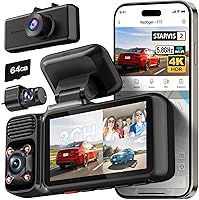
What Is a Dual-Channel Dash Cam?
A dual-channel dash cam is one recorder that runs two cameras at the same time: one facing forward and one facing rearward. Both feeds save to the same memory card, so a single device gives you footage of what happened ahead and behind.
On this page (9 sections)
- How does a dual-channel dash cam work?
- What is the difference between a dual-channel and a single-channel dash cam?
- What are the common dual-channel setups?
- What do the front and rear cameras record?
- What do you need to run a dual-channel dash cam?
- How do you choose between dual- and single-channel models?
- Which dual-channel dash cams are worth a look?
- How does dual-channel footage help after an incident?
- What should you know before you buy?
A dual-channel dash cam is one recorder that runs two cameras at the same time: one facing forward and one facing rearward. Both feeds save to the same memory card, so a single device gives you footage of what happened ahead and behind.
That second view is the whole point. A rear-end hit or a parking-lot bump often looks very different from behind than from the driver's seat.
"Channel" simply means one camera feed, so two channels means two cameras on one system.
How does a dual-channel dash cam work?
A dual-channel system uses one main unit with two camera inputs. The front camera sits on the windshield and the rear camera mounts on the back glass, wired back to the main unit.
The main unit does the recording, timing, and saving. Both feeds carry the same GPS and time stamps, so front and rear clips from the same second line up easily.
Files save as separate front and rear folders on one card.
Because one processor handles both streams, resolution is shared between them. Some systems run 2K in front and 2K in back, while others favor a sharper front.
Our guide to 1080p vs 4K dash cams explains how that split affects plate detail.
Settings and status are shared too. A change on the main unit applies to the rear camera, and the menu reports the memory card's formatting status so you know both channels are ready.
GPS is logged once and attached to both files, so speed and location match during playback.
What is the difference between a dual-channel and a single-channel dash cam?
A single-channel dash cam records only the view ahead. A dual-channel adds a second camera, usually on the rear window, so you capture the road behind as well.
That extra angle matters in common crashes. Rear-end collisions, reversing mishaps, and sideswipes from behind are hard to prove with a front-only view.
A two-camera setup gives your insurer a second perspective of the same event.
The trade-off is a longer install and a slightly higher cost. If you mostly worry about what happens in front of you, a single camera is enough.
There is also a storage difference: a dual-channel model splits the card between two streams, so recording time per card is shorter and an endurance card matters more.
What are the common dual-channel setups?
Most dual-channel dash cams follow one of two layouts: front plus rear-facing, or front plus interior.
Front and rear cameras
This is the standard layout. The second camera faces out the back window and records the traffic behind you.
It's the right choice for everyday drivers who want proof of rear-end hits and following distance.
The rear lens is often smaller than the front one, which makes mounting simpler and more flexible. That helps in cars with a steeply raked rear window or a hatch that swings up.
Front and interior cameras
Here the second camera faces into the cabin. Rideshare and taxi drivers often prefer this, since it records passengers.
Some models combine a front, interior, and rear view, which is where a 3 channel dash cam earns its place.
Interior cameras raise privacy questions. If you drive passengers for hire, disclose the recording.
Check your local rules and your platform's policy before you run one.
What do the front and rear cameras record?
On a typical two-camera model, the front camera records the higher resolution and the rear camera records at a lower one. That split keeps both streams manageable on one card.
The VIOFO A229 Plus runs 2K in front and 2K in the rear, both on Sony STARVIS 2 IMX675 sensors. VIOFO says the dual HDR setup helps hold plate detail on both cameras, even in fast-moving scenes.
The front camera can also run at 60fps for smoother motion, though VIOFO notes that 1440P 60fps is not available while HDR is on. It has 12 voice commands and a 140-degree field of view.
In a parking-lot hit, the front view may show you stopped while the rear view shows the other car reversing into you. Matching time stamps let you present both clips as one event.
For more coverage than two cameras give, see what is a 3 channel dash cam.
What do you need to run a dual-channel dash cam?
You need the two-camera system, a microSD card, and a way to route the rear cable. A hardwire kit is optional but useful for parking coverage.
The memory card matters more than people expect. Both streams write to one card, so pick an endurance card sized for constant recording.
The A229 Plus has no card in the box and supports up to 512GB in a single slot.
Cable routing is the main install job. The rear cable runs from the front unit along the headliner and down a pillar to the back glass.
The A229 Plus kit includes a 6m rear cable, two 3M stickers, a rear mount, and a trim removal tool. If your car is long or the route is awkward, measure the cable run before you buy.
Why add a hardwire kit?
A hardwire kit lets the camera keep recording while the car is parked. It connects to the fuse box instead of the 12V socket, so the camera still has power with the engine off.
The ROVE Hardwire Kit is built for ROVE's USB-C dash cams, including the R2-4K Dual. It includes fuse taps in eight sizes, a 30V voltage meter, and cable clips.
Low-voltage protection cuts power at 11.8VDC on a 12V battery or 23.6VDC on a 24V battery, with four cutoff settings. It also has a built-in 2A fuse for surge protection.
Parking mode comes from the camera, not the kit. The A229 Plus offers three options: auto event detection with a buffer that saves 15 seconds before and 30 seconds after an event, time lapse at low frames per second, and low bitrate continuous recording.
The hardwire cable is sold separately.
How do you choose between dual- and single-channel models?
Choose dual-channel if you want proof of what happens behind you. Choose single-channel if you want a simpler install and only care about the view ahead.
Two channels help most with rear-end collisions, reversing incidents, and parking-lot bumps. The cost is a longer cable run and one more camera to keep clean.
If the rear window is tinted heavily or blocked by cargo, check that the rear camera has a clear view before you commit. A dirty or blocked rear lens records nothing useful.
Which dual-channel dash cams are worth a look?
The VIOFO A229 Plus and the ROVE R2-4K Dual are two solid two-camera picks with different strengths. Both run a front and rear camera and save to one card.
The ROVE R2-4K Dual records an upscaled 4K front view and a 1080P rear view, with a Sony STARVIS 2 sensor up front. It ships with a 128GB card and uses 5.8GHz WiFi for fast phone downloads.
ROVE rates app download speed at up to 20MB/s and supports cards up to 1TB. The screen is a 3-inch IPS panel, and ROVE lists a 150-degree field of view.
The A229 Plus leans on matching 2K cameras at both ends and voice control. Its 5GHz WiFi covers previewing, downloading, and changing settings from the app.
For a closer look at a three-camera ROVE model, read our REDTIGER F17 review to compare layouts.
How does dual-channel footage help after an incident?
Dual-channel footage gives you two angles of the same event, which is often stronger evidence than one. If someone rear-ends you, the rear camera shows the impact and the front camera shows what you were doing.
Synced time stamps mean the clips line up second by second. That makes it easy to show you braked before the hit.
GPS data adds speed and location to each clip.
Save the clips right away by locking the file or pulling the card. Looping recording overwrites old footage, so secure the video right after a crash.
A parking mode event is saved to its own locked folder on models like the ROVE R2-4K Dual, with a voice alert the next time you start the car.
What should you know before you buy?
Know the resolution split, the card, and the install path before you order. Those three details decide whether a two-camera setup works for your car.
Check that the front resolution stays high in both channels if plate detail matters to you. Note that some features trade off against each other, like HDR and 60fps on the A229 Plus.
Pick an endurance card sized for the recording time you want. Plan the rear cable route, or budget for a hardwire install if you want parking mode.
A dual-channel dash cam isn't automatically better than a single one. It's better when you need the view behind you: two cameras, one recorder, and a fuller record of every trip.
Frequently asked questions
Do I need two memory cards for a dual-channel dash cam?
No. A dual-channel system writes both camera feeds to one microSD card, split into front and rear files.
One card with enough capacity and endurance rating covers both channels, so you only manage and replace a single card.
Can a dual-channel dash cam record the inside of the car?
Not usually. Most two-channel setups pair a front camera with a rear camera facing out the back window.
An interior-facing second camera is a different configuration, so check which type of second lens a model uses before you buy.
Does a dual-channel dash cam keep recording when the car is parked?
It can, if the model supports a parking mode and you wire it to constant power. A hardwire kit connects the camera to the fuse box so it keeps watching while the engine is off, and low-voltage protection cuts power before the battery drains too far.
Is a dual-channel dash cam harder to install than a single one?
It takes more work because you run a cable from the front unit to the rear camera, often along the headliner and door pillars. The front camera mounts and powers up like a single-channel unit, so the extra effort is mostly that one long cable run.
Can I watch both channels at the same time?
Yes on most dual-channel models. The screen or phone app lets you view both feeds, and playback shows front and rear clips side by side or as separate files.
Synced timestamps make it easy to match the two views of the same moment.