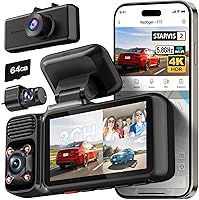
What Is a 3 Channel Dash Cam?
A 3 channel dash cam is one camera unit that records three views at the same time: the road ahead, the road behind and the inside of your cabin. The three feeds save as separate files to one memory card, so you get full coverage from a single install.
On this page (10 sections)
- How does a 3 channel dash cam work?
- What does each of the three cameras record?
- What are the common channel layouts and resolutions?
- How much storage does a 3 channel dash cam need?
- What should you check before buying a 3 channel dash cam?
- Who actually needs three cameras?
- How do you install and set up a 3 channel dash cam?
- What are the downsides of a 3 channel dash cam?
- What else should you know before you buy?
- So, is a 3 channel dash cam worth it?
A 3 channel dash cam is one camera unit that records three views at the same time: the road ahead, the road behind and the inside of your cabin. The three feeds save as separate files to one memory card, so a single install gives you front, rear and interior coverage.
That third lens is the difference from a two-channel setup. A 3 channel dash cam answers the question "what happened behind me and who was in the car" from one windshield mount.
For anyone weighing whether extra cameras are worth it, our guide to do I need a dash cam covers the basics of why people buy one.
How does a 3 channel dash cam work?
Three lenses feed one processor, which writes three video files to the same card. The front camera sits on the windshield, the rear camera mounts at the back window on a long cable, and the cabin lens points into the seats.
The unit records all three at once while you drive. Each feed gets its own resolution, and many units let you set the front lens higher than the other two.
Footage saves in short clips that loop, so the card never fills up.
A GPS module is common on these units, and it stamps speed, location and time onto the video. That data can help when you review a clip later.
What does each of the three cameras record?
Front covers the road and oncoming traffic, rear covers the lane behind you, and the cabin covers passengers and the interior. Each angle catches things the others miss.
The front lens is the main evidence camera. It reads plates and traffic lights ahead and usually gets the highest resolution of the three.
The rear lens watches for tailgaters and rear-end hits. The cabin lens sees passengers, seat belts and anything happening inside the car.
Cabin cameras often add infrared LEDs. Those lights switch on in low light and record the interior in black and white, which helps rideshare drivers document late-night trips.
What are the common channel layouts and resolutions?
Most 3 channel dash cams split resolution across the three feeds rather than giving each one full 4K. The front lens gets the best image, and the rear and cabin lenses step down from there.
The VIOFO A229 Pro 3-Channel runs 4K up front, 2K at the rear and 1080P inside. The 70mai 4K 3-Channel Dash Cam records 4K front, 1080P interior and 1080P rear.
The TERUNSOUL 4K 3-Channel Dash Cam goes 4K front, 4K rear and 1080P cabin.
That spread matters when you compare 1080p vs 4k dash cams. A 4K feed holds more detail for plate reads, but it also writes bigger files.
A 2K or 1080P rear lens is still sharp enough for most claims.
How much storage does a 3 channel dash cam need?
Plan on a larger card than a single-camera setup, because three feeds write three files at once. A 128GB card is a reasonable start, and 256GB gives more room.
All three models here support cards up to 512GB. Two of them ship with a card in the box: the 70mai includes a 64GB card and the TERUNSOUL includes a 128GB card.
The VIOFO A229 Pro ships without one and works best with a high-endurance card built for constant recording.
Loop recording replaces the oldest clips when the card fills. An event lock keeps collision footage from being overwritten.
Check your card's endurance rating, since dash cams rewrite constantly and wear out cheap cards faster.
What should you check before buying a 3 channel dash cam?
Check the three resolutions, the night recording, the parking mode and whether a card is included. Those four points decide most of the value.
Look at the front sensor first. STARVIS 2 sensors in the VIOFO A229 Pro help with low-light detail and plate reading.
HDR on all three channels keeps highlights and shadows balanced when light changes fast.
Next, look at the cabin camera's night setup. The VIOFO uses four infrared LEDs that switch on automatically in low light.
The 70mai lets you turn interior IR on or off as needed. The TERUNSOUL cabin camera also carries four IR lights.
Then check parking mode. All three support some form of parked recording, though a hardwire kit is usually sold separately.
Finally, confirm what's in the box so you don't buy a card twice.
Which 3 channel dash cam should most drivers pick?
The VIOFO A229 Pro 3-Channel is the strongest all-round choice for most drivers, because its 4K front, 2K rear and 1080P cabin feeds pair with STARVIS 2 sensors and HDR on all three. It also adds voice control and 5GHz Wi-Fi for quick clip sharing.
The 70mai 4K 3-Channel Dash Cam suits drivers who want a card in the box. It brings a 64GB card, Wi-Fi 6 transfers and a super capacitor for hot and cold weather.
The TERUNSOUL 4K 3-Channel Dash Cam fits buyers who want the sharpest rear view. Its rear lens also records in 4K, and a 128GB card is included.
Our roundup of the best 3 channel dash cams compares these and other options in more depth. The full REDTIGER F17 review covers another triple-lens model if you want a second read.
Who actually needs three cameras?
Rideshare drivers, families with teen drivers and anyone who parks in public get the most from a third lens. For everyone else, a two-channel setup often covers the basics.
Rideshare drivers benefit most. The cabin lens documents passengers and disputes inside the car, and the front and rear feeds cover the trip itself.
Families get a record of who was in the car and whether seat belts were worn.
Drivers who park on streets or in shared garages gain from parked recording. A third lens can catch someone reaching into the car or a hit while you're away.
If you mainly want proof of what happened on the road, a front-and-rear pair is simpler and cheaper. The cabin view only earns its keep when something happens inside the car.
How do you install and set up a 3 channel dash cam?
Mount the front unit on the windshield and run the rear cable to the back window. Some models, like the VIOFO A229 Pro, use a separate cabin camera connected by its own short cable.
Then set the resolutions and test all three feeds before you drive.
Start by cleaning the glass where the mount sticks. Position the front camera so it doesn't block your view of the road.
The VIOFO kit includes a static sticker and a trim removal tool to help tuck cables along the headliner.
Route the rear cable down the edge of the windshield, under the trim and back to the rear window. Keep it away from airbags.
Plug the unit into the car charger and set the time, the GPS and the three resolutions in the app.
Check each feed on the app or screen before the first drive. Confirm the cabin camera sees the full row of seats and the rear lens shows the lane behind you.
Format the card in the camera, not on a computer.
What are the downsides of a 3 channel dash cam?
Three feeds mean more storage use, more cable to route and more cost than a single camera. The trade-offs are real, and they matter most in small cars.
The rear cable run takes the most effort. A long cable down the length of the car can be fiddly in tight interiors.
A cabin lens also raises privacy questions, since it records passengers and conversations.
Files are bigger, so cards fill sooner and need higher endurance ratings. And a triple-lens unit costs more than a basic front camera.
If you rarely carry passengers and never park in risky spots, the third lens adds little.
Weigh those costs against what you want to prove. A 3 channel dash cam earns its price when a cabin view settles a dispute the road cameras can't.
What else should you know before you buy?
Check your state's recording laws and confirm the card type before you order. Both catch new buyers out.
Recording the cabin captures passengers and audio. Some states require consent from everyone in the car, so check your local rules first.
Audio can usually be switched off in the settings, which reduces one privacy concern.
Also confirm which memory card the camera needs. The VIOFO A229 Pro takes a microSD card and recommends its own high-endurance line.
Cards sold for phones often wear out faster under constant recording.
A hardwire kit for parking mode is usually a separate buy. The VIOFO notes its HK4 Acc kit is not in the box.
Plan that cost before you install.
So, is a 3 channel dash cam worth it?
Yes, if you carry passengers or park in public, because the cabin and rear views catch what a front camera misses. For a solo commuter who parks at home, a single front camera does most of the work.
A 3 channel dash cam records the road ahead, the road behind and your cabin in one install. Pick the VIOFO A229 Pro 3-Channel for the best image across all three feeds.
Pick the 70mai 4K 3-Channel Dash Cam if you want a card in the box, or the TERUNSOUL 4K 3-Channel Dash Cam for a sharper rear view.
Before you buy, decide what you actually need to prove. If it's the road only, save the money.
If it's the whole car and the people in it, three lenses earn their place.
Frequently asked questions
Can a 3 channel dash cam record audio?
Yes. Most units have a built-in microphone you can switch on or off, and audio is usually attached to the cabin or front clip.
Check which feed carries sound before you rely on it as evidence.
Is a 3 channel dash cam legal in every state?
Not always. Recording the cabin captures passengers and your own conversations, and some states require consent from everyone in the car.
Check your state's recording and audio laws before installing one.
Can I view the rear and cabin cameras while driving?
Yes, on models with an app or a screen. The VIOFO A229 Pro includes voice commands to show the front or rear camera.
Switch views only when it's safe, or leave the display on one feed and review the rest later.