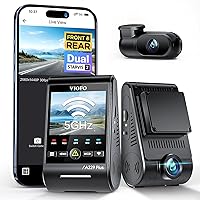
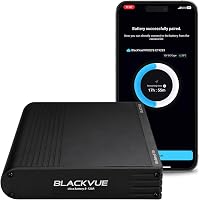
Is There a Completely Wireless Dash Cam?
Yes, a completely wireless dash cam exists, but truly cable-free models are limited. Most dash cams sold as wireless still need a power cable to the 12V socket or fuse box, and the wireless label usually means Wi-Fi video transfer, not cable-free power.
On this page (9 sections)
- Is there a completely wireless dash cam, or is wireless only about video?
- How do completely wireless dash cams get power?
- What does "wireless" actually mean on a dash cam box?
- Can you run a dash cam with no cable at all?
- Which setup suits a completely wireless install?
- Does a wireless dash cam still need a cable for parking mode?
- How do you hide the cable on a dash cam install?
- Does a wireless dash cam drain the car battery?
- Is a completely wireless dash cam worth it?
Yes, a completely wireless dash cam exists, but truly cable-free models are limited. Most dash cams sold as wireless still need a power cable to the 12V socket or fuse box, and the wireless label usually means Wi-Fi video transfer, not cable-free power.
Drivers searching for a completely wireless dash cam usually mean one thing: no cable running down the windshield. Getting there takes more than picking a model with "wireless" in its name.
The power path decides whether you end up with a clean install or a cord hanging by the mirror.
Is there a completely wireless dash cam, or is wireless only about video?
A small number of dash cams run on internal batteries alone, but the mainstream "wireless" label describes the data connection, not the power connection. Most cameras need some cable to the car's electrical system, and only the phone link is cable-free.
The confusion starts with marketing. A dash cam with Wi-Fi and Bluetooth lets you watch footage and change settings from your phone without plugging in a cable.
That makes the camera wireless in the same way a smart doorbell is: the radio link is cordless, the power is not.
So when you see a camera advertised as wireless, check what it plugs into. If it has a 12V adapter or a fuse tap in the box, the windshield still gets a wire.
True battery-only cameras exist, but they are the exception rather than the rule.
How do completely wireless dash cams get power?
Wireless dash cams get power in one of three ways: an internal battery, a plug into the 12V socket, or a hardwire kit to the fuse box. Each one changes how much cable you see and how long the camera keeps running when the engine is off.
Battery-only models
Battery-only cameras carry their own cell and record without any external cable. That is the closest thing to a completely wireless dash cam.
The trade-off is charging: you take the camera down or plug it in to top it up, and parking recording only lasts as long as the charge.
12V socket models
These come with a cable to the cigarette lighter socket. The camera records while the engine runs and stops when the socket loses power.
The cable is easy to route along the headliner and down the A-pillar, but it is still a cable.
Hardwired models
A hardwire kit connects the camera to the fuse box and hides the wiring completely. You see no cable at the windshield, and the camera keeps running for parking monitoring.
The trade-off is the install: you need fuse taps, a volt meter and some patience. If you want continuous power without the visible cord, a hardwired setup is the usual answer.
What does "wireless" actually mean on a dash cam box?
On most dash cam boxes, "wireless" means Wi-Fi and Bluetooth for phone access, not cable-free power. The camera still needs a power source, and the only cordless part is the connection to your smartphone.
That Wi-Fi link does real work. You can review clips on the Garmin Drive app without pulling the memory card, and on some models you can control recording by voice.
Bluetooth usually handles the initial setup and settings changes.
The Garmin Dash Cam Mini 3 shows how the label works in practice. It has Bluetooth, USB and Wi-Fi connectivity, plus voice control in six languages.
Garmin includes a vehicle power cable and a dual-USB power adapter in the box, so the camera still needs a cable to the car's power. The wireless part is the phone connection and the online Vault storage for saved clips.
Can you run a dash cam with no cable at all?
You can run a dash cam with no external cable only if it runs on an internal battery, and those models need regular charging. A battery camera is the real cable-free option, and it works best for short trips rather than all-day parking.
The Garmin Mini 3 has a lithium manganese dioxide battery cell, but its own parking features need more than that. Garmin says the parking guard notification requires a paid Vault subscription, active Wi-Fi, constant power and the Garmin Drive app.
Live view has the same constant power requirement. So the camera's most useful remote features push you back to a cable.
If cable-free recording is your priority, look at models designed around a battery and accept the charging routine. Our guide to whether there is a battery operated dash cam covers how those models handle power and parking.
Which setup suits a completely wireless install?
A hardwire kit gives you the cleanest windshield with no visible cable, while a battery camera gives you the fewest cables overall. The right choice depends on whether you want parking recording or a removable camera.
For a hidden install that runs 24 hours, hardwire the camera. The ROVE Hardwire Kit connects to the fuse box and hides the wiring, and its low voltage protection cuts power when the battery drops below the set level.
It includes fuse taps, a 30V voltage meter, a fuse puller and trim tools, so the install is a DIY job rather than a shop visit.
For a cable-free camera you can move between cars, choose a battery model and plan to charge it. For most drivers who want a wireless-looking windshield, the hardwire kit is the more practical route.
Does a wireless dash cam still need a cable for parking mode?
Yes, in most cases parking mode needs constant power, and that comes from a cable to the fuse box or a charged internal battery. Wireless video transfer does not keep a camera awake overnight.
Parking guard and live view features are the ones that run while you are away from the car. Garmin's parking guard and live view both require constant power on the Mini 3.
ROVE says its hardwire kit provides continuous power for the 24-hour parking monitor on its compatible cameras.
So the honest answer to whether a wireless dash cam needs a cable is: for driving footage, maybe not; for parking footage, almost always yes. If you want the parking features, plan the hardwire from the start.
How do you hide the cable on a dash cam install?
Route the cable along the headliner and behind the A-pillar trim, then into the fuse box or 12V socket. With a few clips and some patience, even a cabled camera leaves almost nothing visible.
Clean the trim before you stick anything to it. Run the cable above the door seals rather than across the glass, and keep it away from the airbag zone in the pillar.
Small adhesive clips keep the last stretch tidy near the fuse box.
The KnotKing Adhesive Cable Clips hold cords up to 0.22 in (5.6mm) in diameter. They stick to glass, plastic, wood and metal, but not to leather, rubber or silicone.
For a thicker cable or a heavy run, let the adhesive bond for 24 hours before you load the clip.
Does a wireless dash cam drain the car battery?
A wireless dash cam drains the car battery only when it stays on constant power with the engine off. A camera plugged into a socket that cuts with the ignition draws nothing when the car is parked.
The risk comes from hardwired parking mode. A proper kit monitors voltage and shuts the camera down before the battery drops too far.
ROVE's kit cuts power at 11.8VDC on a 12VDC battery and 23.6VDC on a 24VDC battery, with four cutoff settings to choose from.
Check how your car's sockets behave before you rely on them. Some stay live after the key is out.
If yours does, a camera left in the socket keeps drawing power all night.
Is a completely wireless dash cam worth it?
A completely wireless dash cam is worth it if you want the fewest cables and don't need round-the-clock parking recording. If you want 24-hour protection, a hardwired camera gives you more for the same effort.
Start with what you need from the camera. If it's driving footage and easy phone transfer, a Wi-Fi model with a socket cable is simple and enough.
For a clean install, hardwire a camera and use clips to hide the last stretch. For no cable at all, choose a battery model and build the charging routine into your week.
The video quality question matters too. Compare 1080p vs 4K dash cams before you decide how much resolution you need.
If you're still weighing whether a camera is for you, read do you need a dash cam first. And if you plan to run parking mode, check the supercapacitor vs battery dash cam comparison so your power choice matches the camera's heat tolerance.
For most drivers who ask whether there is a completely wireless dash cam, the practical answer is a camera with Wi-Fi for the phone and a hidden hardwire for the power. That combination looks wireless at the windshield and still records when the car is parked.
Frequently asked questions
Is there a completely wireless dash cam that needs no cable at all?
Yes, a few models run only on an internal battery and record without any cable, but they usually need regular charging. For constant parking recording, a hardwire kit is still the normal solution, so most drivers end up with at least one cable.
Do wireless dash cams use Wi-Fi or Bluetooth?
Most wireless dash cams use Wi-Fi for video transfer and Bluetooth for setup and settings. Those radios remove the cable to your phone, not the cable to your car's power supply.
Can a battery-powered dash cam record while the car is parked?
It can, but only for as long as its internal battery lasts. Parking guard and live view features on many models require constant power from the fuse box, so check what the camera needs before relying on battery power.
Is a hardwired dash cam better than a wireless one?
A hardwired install gives you continuous power and a cleaner windshield with no cable hanging down. A wireless model suits drivers who want a quick, removable setup and don't need 24-hour parking recording.