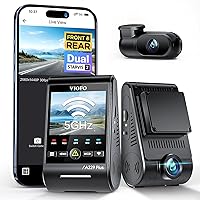
Is a 2K Dash Cam Good Enough?
Yes, a 2K dash cam is good enough for most drivers. 2K footage at 1440p resolves license plates and road signs in normal daylight, and it stores more video per card than 4K while costing less.
On this page (8 sections)
- What does 2K mean on a dash cam?
- Is a 2K dash cam good enough to read license plates?
- How does 2K compare with 1080p and 4K?
- Does 2K fill a memory card faster than 1080p?
- Is a 2K dash cam good enough at night?
- Which 2K dash cam should you pick?
- When is 2K not good enough?
- Is a 2K dash cam good enough for you?
Yes, a 2K dash cam is good enough for most drivers. A 2K camera records at 1440p, which is sharp enough to read license plates and road signs in normal daylight.
It also costs less than 4K and stores more footage on the same memory card.
That makes 2K the sensible middle ground for everyday driving. This guide explains when 2K is plenty and when you should spend more.
What does 2K mean on a dash cam?
2K means a resolution of about 2560 x 1440 pixels, often sold as 1440p or QHD. That's roughly twice the pixel count of 1080p and about half that of 4K.
The VIOFO A119 V3 records at 1440P QHD+ at 60fps, with a 2560 x 1440P 60fps option when HDR is off.
The extra pixels over 1080p show up as finer detail on plates and signs. Most drivers never need more than this for insurance claims or incident reports.
The label on the box is only part of the story, because 2K cameras offer several resolution settings. The VIOFO A119 V3 can also record at 2880 x 2160P at 30fps, 2560 x 1600P at 30fps, 2304 x 1296P at 30fps, 1920 x 1080P at 60 or 30fps, and 1280 x 720P at 120, 60 or 30fps.
A higher frame rate smooths motion, while a higher pixel count holds more detail in a still frame. Many drivers leave the camera on its default setting and never touch these options.
Knowing they exist helps you decide which trade-off you want. See how the resolutions compare in our 1080p vs 4K dash cam breakdown.
Is a 2K dash cam good enough to read license plates?
Yes, in most daytime and well-lit night driving, 2K footage resolves plates clearly. A plate fills more pixels at 1440p than at 1080p, so characters stay readable at typical following distances.
At night, headlights and a wide aperture matter as much as resolution.
The VIOFO A119 V3 uses a Sony STARVIS IMX335 sensor with an f/1.6 aperture and HDR, which helps keep plates legible in harsh light. The Thinkware Q200 adds WDR and Super Night Vision 2.0 for low-light clips.
Distance, speed and motion blur still decide whether a single plate reads on any camera.
The lens also shapes how much of the road reaches the sensor. The VIOFO A119 V3 uses a 7 element glass lens with a 140 degree field of view, which covers several lanes while keeping distortion low.
The Thinkware Q200 uses a 125 degree field of view across its front and rear cameras. A wider lens shows more of the scene but stretches each pixel over a larger area, so a plate sits smaller in the frame.
That is one reason a slightly narrower lens can read a plate better than a very wide one at the same resolution.
How does 2K compare with 1080p and 4K?
2K sits between the two: sharper than 1080p, lighter and cheaper than 4K. The step from 1080p to 2K gives you the biggest gain in detail per dollar.
The step from 2K to 4K costs more and fills memory cards faster.
The VIOFO A119 V3 shows the trade-off inside one camera: it records 2560 x 1440P at 60fps with HDR off, but only 1440P at 30fps with HDR on. Higher resolution and HDR both compete for processing power.
For most drivers, 2K leaves enough headroom for HDR to work.
Compression keeps those files manageable. The VIOFO A119 V3 uses H.264 compression, which stores 2K footage at a sensible size without a visible drop in quality.
That matters because dash cams record in a loop all day. A codec that wastes space fills the card sooner and overwrites useful clips earlier.
At 2K, most cameras strike a fair balance between detail and file size.
Does 2K fill a memory card faster than 1080p?
Yes, but not so fast that a good 128GB card becomes a problem. 2K files are bigger than 1080p files and smaller than 4K files.
The SANDISK 128GB High Endurance card is built for continuous dash cam recording and rated V30 for sustained video writes.
That speed class matters more than raw capacity, because a slow card can stutter and drop frames. The VIOFO A119 V3 supports microSD cards up to 256GB and recommends U3 A2 V30 cards.
A 2K camera paired with a high endurance card in the 128GB to 256GB range keeps loop recording running smoothly.
Card choice also affects how long the camera lasts. SanDisk says the High Endurance card is designed for up to 10,000 hours of recording, and that figure drops for higher-resolution video.
Dash cams rewrite the same card constantly, so a card built for endurance outlasts a generic one. VIOFO warns against generic Class 10 cards because they are not made for dash cam use.
Both the VIOFO 256GB card and the SanDisk MAX ENDURANCE or Extreme cards appear on its recommended list. Format any new card inside the camera before the first recording session.
Is a 2K dash cam good enough at night?
Yes, when the sensor and aperture do the heavy lifting. Resolution alone won't save a dark clip.
The VIOFO A119 V3's STARVIS sensor and f/1.6 lens are designed to pull detail from low light, and HDR balances bright headlights against dark shadows.
The Thinkware Q200 pairs 2K QHD with WDR and Super Night Vision 2.0 across front and rear cameras. A 2K camera with a good sensor often beats a 4K camera with a small lens in the dark.
Check the aperture and sensor type before you judge a camera by its resolution number alone.
HDR is the setting that does the most work after dark. The VIOFO A119 V3 uses true HDR to hold both bright highlights and deep shadows in one frame, so a plate lit by headlights stays readable instead of blowing out to white.
Turning HDR on limits the camera to 1440P at 30fps, a trade-off worth taking for night footage. The Thinkware Q200 relies on WDR and Super Night Vision 2.0 for the same job.
Both approaches aim at the same goal: keep the bright and dark parts of the scene readable at once.
Which 2K dash cam should you pick?
Start with the VIOFO A119 V3 if you want a single front camera that gets the basics right. It records 2K QHD+ at up to 60fps, adds GPS for speed and route data, and supports buffered parking mode with the optional hardwire cable.
Its 140° field of view covers the road without heavy distortion.
It's a straightforward, well-rounded 2K camera for most cars.
The GPS module earns its place in a claim. It records real-time speed, timestamp and route data onto the video files, and compatible playback viewers display those details.
GPS coordinates and the timestamp overlay add documentation to the footage, and the built-in module syncs satellite time automatically. Parking mode comes in three forms: auto event detection, time lapse and low bitrate recording.
Auto event detection buffers 15 seconds before and 30 seconds after an event. Parking mode needs the VIOFO HK3 ACC hardwire cable, sold separately, to switch modes with the ignition and monitor voltage so the car battery is protected.
Who should choose the Thinkware Q200 instead?
Choose the Thinkware Q200 if you want front and rear coverage in one 2K kit. It records 2K QHD from both cameras, includes a 32GB card and a hardwiring cable, and connects to the THINKWARE DASH CAM LINK app over Wi-Fi.
Built-in GPS adds speed and red light alerts to the footage. That makes it the better fit for drivers who want one purchase to cover the whole car.
The app does more than review footage. You pair the camera with Android or iOS, then view clips, download them and adjust settings from the phone.
Parking surveillance detects motion and impacts while the car sits, with time-lapse and energy-saving modes for longer coverage. To enable parking mode, power the camera through hardwiring, OBD-II or an iVolt battery, open the app, go to Dash Cam Settings, then Record Settings, and pick the mode you want.
If the app won't connect, turn on Wi-Fi and Bluetooth, make sure you're joined to the camera, and disconnect Apple CarPlay or Android Auto, which can block the link. Our roundup of the best 2K dash cams compares more front and dual options.
What should you check before buying any 2K camera?
Check three things: the sensor type, the aperture, and the card support. A 2K camera with a STARVIS-class sensor and an f/1.6 lens will outread a generic 2K model in low light.
Confirm the maximum card size and the recommended speed class so you buy the right memory card. Then decide whether you want one camera or front and rear.
Our best 2K dash cam roundup ranks the models that get these details right. If you're still deciding whether you need a camera at all, read do I need a dash cam first.
When is 2K not good enough?
2K falls short when you need to zoom deep into a distant plate or read fine detail from far away. 4K footage carries more pixels for cropping and enlargement.
If your main goal is capturing plates at long range on highways, 4K gives you more room to crop in.
2K also struggles when the sensor is weak or the lens is small, because resolution can't fix a dark image. For most city and suburban driving, though, 2K captures what you need.
Buy 4K only when long-distance detail is the priority. Otherwise the extra cost and storage load buy little.
Is a 2K dash cam good enough for you?
For most drivers, yes: a 2K dash cam is good enough and often the smartest buy. It reads plates and signs in daylight, holds up at night with a good sensor, and stores more footage per card than 4K.
Pick the VIOFO A119 V3 if you want one front camera with GPS and parking mode.
Pick the Thinkware Q200 if you want front and rear coverage with Wi-Fi and a hardwiring cable included. Pair either with the SANDISK 128GB High Endurance card so loop recording never stalls.
Step up to 4K only if long-range plate detail is your main goal. For everything else, 2K is the practical middle ground.
Frequently asked questions
How many hours of footage fits on a 128GB card at 2K?
It varies with bitrate and frame rate. A 2K clip is larger than 1080p but smaller than 4K, so a 128GB high endurance card holds several hours of loop recording.
The camera overwrites the oldest clips automatically.
Does a 2K dash cam use more power than 1080p?
Slightly more, because the higher resolution and bitrate work the processor harder. In parking mode the difference is small next to the camera's own power-saving settings.
Hardwire the camera properly so it can shut down before the battery drains.
Is a 2K dash cam worth the extra cost over 1080p?
Yes for most drivers. The jump from 1080p to 2K is the biggest step up in detail per dollar, and 2K stays cheaper than 4K.
Only buyers who want maximum zoom-in detail should pay the 4K premium.
Will a 2K dash cam work with a 256GB card?
Many 2K models accept cards up to 256GB when the card is rated for high endurance video. The VIOFO A119 V3 supports microSD cards up to 256GB and recommends U3 A2 V30 cards.
Always format the card in the camera before first use.