8 Best Easy-to-Use Dash Cams (October 2026)
The best easy-to-use dash cams include the ROVE R2-4K Dual for front and rear coverage, the Garmin Dash Cam Mini 3 for a compact voice-controlled camera, and the Garmin Dash Cam 67W for voice control and a wide view.
On this page (6 sections)
The ROVE R2-4K Dual is the highest-scoring easy-to-use dash cam here, with front and rear recording, a screen and voice guidance. For a compact camera with voice control, choose the Garmin Dash Cam Mini 3; for on-camera playback, choose the Garmin Dash Cam X110.
Easy operation means the camera records when you start driving and makes it clear how to save or review an important clip. Some drivers want a screen they can use in the car, while others prefer voice commands or an app.
Our guide to the best dash cams for everyday driving compares broader options. If you want to keep the budget in mind, see our best dash cams under 100 dollars, or compare Garmin choices in Garmin dash cam models.
Our picks at a glance
-
1

-
2

-
3

How we chose easy-to-use dash cams
Easy-to-use dash cams make routine recording automatic and clip saving clear. We compared controls, displays, included setup items and how each camera handles footage access.
We gave more weight to features that reduce steps during a normal drive, such as automatic recording, voice commands, an on-camera screen and a memory card in the box. App-based controls can also work well, but they rely on a compatible phone and an extra connection when you want to change settings or view clips.
Our score weighs specs and features against the goal of straightforward use. It doesn't represent product testing.
| Product | Best for | Cameras | Screen | Included card | Our score |
|---|---|---|---|---|---|
| ROVE R2-4K Dual | front and rear coverage | Front and rear | 3-inch IPS | 128GB microSD | 9.1 |
| Garmin Dash Cam Mini 3 | a compact voice-controlled camera | 8.2 | |||
| Garmin Dash Cam 67W | voice control and a wide view | 16GB microSD | 8.0 | ||
| VIOFO A119 V3 | automatic recording with GPS | 8.0 | |||
| Vantrue E1 Lite | app and voice controls | 7.6 | |||
| Garmin Dash Cam X110 | on-camera playback | 2.4-inch LCD | 7.4 | ||
| galphi 4K Front Dash Cam | screen-free recording | None | 32GB microSD | 7.4 | |
| 70mai M310 Plus | phone-first operation | None | 7.3 |
Which dash cam controls feel simplest day to day?
A screen and voice commands suit drivers who want to use the camera itself, while a screen-free model suits people comfortable with a phone app. Choose based on whether you value direct playback, fewer visible controls or hands-free clip saving.
Dash cams that start recording automatically when powered can record without a phone connection. The app is useful for viewing clips, changing settings or sharing footage, and some remote services require Wi-Fi or a paid plan.
Which easy-to-use dash cam works well for seniors?
The Garmin Dash Cam X110 has a screen and voice control for drivers who want to review clips in the car. The Garmin Dash Cam Mini 3 accepts spoken commands in a much smaller body, but has no display.
If you help a family member set up a camera, show them how to confirm recording, save an incident clip and find the memory card slot. Practice those steps while parked so they are familiar before a drive.
Which easy-to-use dash cams fit your control preferences?
These easy-to-use dash cams offer choices from on-camera playback to voice commands and phone-first control. The ROVE R2-4K Dual has the highest score, 9.1, followed by the Garmin Dash Cam Mini 3 at 8.2 and the Garmin Dash Cam 67W and VIOFO A119 V3 at 8.
ROVE R2-4K Dual: Best for front and rear coverage
- Front and rear recording
- 3-inch IPS screen
- Voice guidance
- Free 128GB card
Front and rear recording, a screen, voice guidance and an included card give you several ways to manage footage. The app adds phone access.
Pros
- Front and rear cameras
- Voice guidance
- Card included
Cons
- More equipment and cable routing than a single-camera setup
- Parking mode requires a separate hardwire kit
The ROVE R2-4K Dual is the highest-scoring option for drivers who want front and rear cameras and several ways to manage recordings. Its front camera captures at 2.5K and upscales to 4K, while the rear records at 1080p.
A 3-inch IPS screen shows live speed and compass information, and voice guidance helps you follow camera prompts. The included 128GB microSD card provides storage, and the package includes a trim tool and clips for routing the rear camera cable.
The ROVE app lets you view and manage recordings on a phone, and the camera supports GPS playback on a computer. Front and rear recording takes more setup than a single front camera.
Choose it if you want front and rear coverage, an on-camera screen and voice prompts. Parking mode requires a hardwire kit that is not included.
Garmin Dash Cam Mini 3: Best for a compact voice-controlled camera
- Key-sized camera
- Voice control
- Automatic incident saving
- Garmin Drive app
This key-sized camera records automatically and accepts spoken commands to save video. It has no screen for in-car playback, and some remote features require a paid Vault subscription.
Pros
- Small windshield footprint
- Voice commands can save video
- Glare-reducing polarizer
Cons
- No on-camera screen for playback
- Some remote features require a paid subscription and Wi-Fi
The Garmin Dash Cam Mini 3 is a key-sized camera for drivers who prefer a low-profile setup. It records 1080p video with a 140-degree field of view.
Voice control can save video and start or stop audio recording. The built-in polarizer reduces windshield glare, and incident clips save automatically.
The tradeoff is no on-camera screen. You can view and share clips through the Garmin Drive app, while Vault storage and remote live view require a paid subscription and active Wi-Fi.
Choose the Mini 3 if you want automatic recording and spoken commands in a compact camera. Pick the Garmin Dash Cam X110 instead if you want to replay clips directly on the device.
Garmin Dash Cam 67W: Best for voice control and a wide view
- 180-degree field of view
- Voice control
- Automatic incident saving
- 16GB card included
Voice commands handle common recording actions, and the 180-degree lens captures a broad view. Saved clips can upload over Wi-Fi to Garmin Vault.
Pros
- Voice control
- Very wide field of view
- Card included
Cons
- A 16GB card gives less storage than some included-card options
- Remote viewing depends on Wi-Fi and constant power
The Garmin Dash Cam 67W combines voice control with a 180-degree field of view. It records 1440p video, saves detected incidents with GPS location, date and time, and includes a 16GB microSD card.
Spoken commands handle saving clips, starting or stopping audio and taking still pictures. Saved clips can upload over Wi-Fi to Garmin Vault for viewing and sharing.
The wide lens captures more of the scene, including cross traffic. Remote live view needs constant power and an active Wi-Fi connection.
Choose this model if you want a broad view and voice control, with a card included. Consider the Garmin Dash Cam X110 if on-camera playback matters more.
VIOFO A119 V3: Best for automatic recording with GPS

- Auto start and stop
- GPS mount
- G-sensor emergency recording
- Loop recording
Auto start and stop, loop recording and a GPS mount cover the main recording tasks. Parking mode has additional setup choices and needs a separate hardwire cable.
Pros
- Auto start and stop
- GPS mount included
- Three parking mode options
Cons
- Memory card sold separately
- Parking mode requires a separate hardwire cable
The VIOFO A119 V3 keeps everyday recording straightforward with automatic start and stop, loop recording and a G-sensor that can trigger emergency recording. Its GPS mount can add speed, time and route data to video.
It records 1440p QHD+ at up to 60fps when HDR is off. The camera supports cards up to 256GB, and a card is sold separately.
There are three parking modes, but using parking mode requires a separate VIOFO HK3 ACC hardwire cable. Choose this camera if you want routine driving footage with auto start and stop, and are comfortable choosing a card and setting options.
Vantrue E1 Lite: Best for app and voice controls

- App control
- Multilingual voice commands
- Built-in GPS
- No subscription for app control
The E1 Lite pairs app controls with voice commands for locking clips and other actions. It records 1080p video at 30fps with a 160-degree field of view.
Pros
- Voice and app controls
- Built-in GPS
- 160-degree field of view
Cons
- Parking mode requires a separate hardwire kit
- No screen size is specified
The Vantrue E1 Lite combines app control, GPS and multilingual voice commands. You can use spoken commands for actions such as locking emergency video, taking a photo or switching Wi-Fi on and off.
It records 1080p video at 30fps with a 160-degree lens. The Vantrue app supports live view, GPS tracking and remote configuration, with no subscription stated for app control.
Parking mode needs a separate Vantrue hardwire kit. Choose this camera if you want voice and app control and don't mind using a phone to manage footage.
Garmin Dash Cam X110: Best for on-camera playback
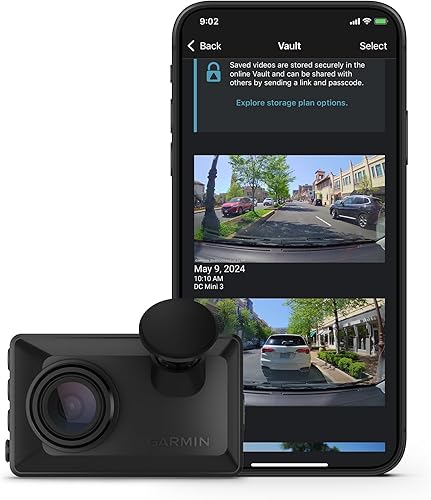
- 2.4-inch LCD
- Voice control
- Automatic incident saving
- Garmin Drive app
The LCD lets you review clips in the car, while voice control can save video without reaching for the camera. Some remote and Vault features require a paid subscription and active Wi-Fi.
Pros
- On-camera playback
- Voice commands for saving clips
- Automatic incident saving
Cons
- Some remote features require a paid Vault subscription
- No memory card is listed among the included items
The Garmin Dash Cam X110 suits drivers who want to review a clip without opening a phone app. Its 2.4-inch LCD supports immediate playback, while voice commands can save video and start or stop audio recording.
It automatically saves video when it detects an incident. Garmin describes the X110 as recording 1080p HD video, with a 140-degree field of view.
Garmin Vault can store saved clips for viewing and sharing through the Garmin Drive app. Remote live view and parking notifications require a paid Vault subscription, Wi-Fi and constant power.
Choose it if you want a screen and spoken controls in one compact front camera. Its included items do not include a memory card.
galphi 4K Front Dash Cam: Best for screen-free recording

- Screen-free design
- App control
- 32GB card included
- Automatic recording when powered
This screen-free camera starts recording when powered, and its app provides camera controls and footage access.
Pros
- Screen-free design
- Card included
- Recording starts when powered
Cons
- Phone app is used for camera control
- Parking mode requires a separate hardwire kit
The galphi 4K Front Dash Cam has no screen and starts recording when it receives power. Its app handles settings and footage access, so routine recording does not require connecting your phone each time.
A 32GB card is included, and the camera supports up to 256GB. It comes with a cable trim tool and clips to help route the power cable.
The screen-free design means you'll use the phone app to manage the camera. Parking mode requires a Type C hardwire kit, sold separately.
Choose it if you want automatic recording and are comfortable using an app instead of a display.
70mai M310 Plus: Best for phone-first operation

- Screen-free design
- App control
- Voice control
- Loop recording
This screen-free camera offers voice control and app access for clips and settings. Drivers who want to review video on the camera itself should choose a model with a display.
Pros
- Voice and app controls
- Screen-free design
- Loop recording
Cons
- No on-camera display
- Parking mode requires a separate hardwire kit
The 70mai M310 Plus is a phone-first option with no display. It offers app control and voice commands for tasks such as locking videos, taking photos and controlling audio.
It records in 4K UHD with a 140-degree field of view. Loop recording overwrites the oldest unprotected footage as storage fills.
Choose it if you want a screen-free camera and are comfortable using a phone app. Its parking mode needs a separate hardwire kit, and there is no on-camera playback.
What should you check before choosing an easy dash cam?
Choose a camera by the task you want to make simple: setup, saving clips, reviewing footage or managing storage. A model with more features may add steps you do not need.
Check how it saves and plays clips. The Garmin Dash Cam X110 has an on-camera display; the Mini 3, galphi and 70mai models have no display.
Voice control can help save a clip without touching the camera, but supported commands and languages differ.
Check what's included. The ROVE R2-4K Dual includes a 128GB card, the Garmin Dash Cam 67W includes a 16GB card, and the galphi 4K Front Dash Cam includes a 32GB card.
The VIOFO A119 V3 does not include a card, so add compatible storage to your setup.
Plan the cable route. A front-only camera generally has fewer cables to route than a front and rear system.
Follow the camera maker's placement guidance and check your state's windshield rules; our dash cam mounting guide covers basic considerations.
Separate driving use from parking mode. Several cameras need an added hardwire kit for parking features.
If you mainly want footage while driving, you can skip that extra setup; for more detail, see whether you need a dash cam battery pack.
How can you make dash cam setup easier?
Start by deciding where you will mount the camera and how you will access clips. Then follow the included instructions, route the cable safely and confirm that the camera records when the car is powered.
Before driving, check the camera's date and time, set the voice or app options you plan to use, and make a short practice clip. If the camera uses a memory card, learn how to save an important file before loop recording can overwrite it.
For a screen-free model, install its app and learn how to connect while parked. Keep your phone out of your hands while driving, and use voice commands only if you can do so without distraction.
Which easy-to-use dash cam should you choose?
Pick the Garmin Dash Cam X110 if you want a screen for in-car playback and voice control. Choose the Mini 3 if a very small camera and spoken commands matter more than a display.
Choose the ROVE R2-4K Dual for front and rear coverage, a screen and voice guidance. If you prefer a screen-free camera, compare the galphi and 70mai options, then read how to watch dash cam footage on a computer for another way to access saved clips.
Our top 3 picks at a glance
-
1
-
2
-
3
Frequently asked questions
What makes a dash cam easy to use?
Automatic recording, clear controls and a simple way to save or review clips make a dash cam easier to manage. A screen can help you check footage in the car, while voice control can save a clip without reaching for the camera.
Think about whether you'd rather use a screen, spoken commands or a phone app.
Which dash cam is easiest for seniors to use?
The Garmin Dash Cam X110 is a good fit if you want an on-camera screen and voice control. Its 2.4-inch display supports playback in the car, and spoken commands can save clips.
If you prefer a very small camera with voice control, the Garmin Dash Cam Mini 3 is another option, but it has no screen.
Do easy-to-use dash cams need a phone app?
No. The Garmin Dash Cam X110 and VIOFO A119 V3 provide on-camera controls, and the X110 has a screen for playback.
App access is useful for viewing or sharing clips, but it adds a phone connection step.
Check which tasks you can do on the camera before choosing an app-first model.
Can a dash cam record without a phone connection?
Yes. Dash cams can record automatically when they receive power, without a phone connection.
The galphi 4K Front Dash Cam starts recording when powered.
Phone apps can provide settings and footage access, so a phone connection isn't needed for routine recording on this model.
Is a screen-free dash cam easier to use?
A screen-free dash cam has no display for playback, so you'll use an app or voice commands to manage settings and clips. The galphi 4K Front Dash Cam and 70mai M310 Plus have no display.
Choose one if you rarely need to check footage in the car; pick a screen model if immediate playback matters.


