8 Best Mirror Dash Cams With a Backup Camera (October 2026)
The best mirror dash cams with backup cameras include the WOLFBOX G840S Mirror Dash Cam for large vehicles, the WOLFBOX G850 PRO Mirror Dash Cam for driver alerts, and the WOLFBOX G930 Mirror Dash Cam for compact cabins.
On this page (6 sections)
- How we chose mirror dash cams with backup cameras
- Which mirror dash cam with a backup camera fits your needs?
- How do you choose a mirror dash cam with a backup camera?
- How do you set up a mirror dash cam and rear camera?
- What common mirror dash cam buying mistakes should you avoid?
- Which mirror dash cam with a backup camera should you buy?
The WOLFBOX G840S is the best mirror dash cam with a backup camera for most drivers, combining 4K front recording, a 1080p rear camera, GPS and a 12-inch display. Choose the VROAVIE if you want views from both sides, or the G930 if you need a 10-inch screen.
A mirror dash cam usually straps over your factory mirror and shows a live rear camera image on its screen. That view can help when passengers, cargo or a tall vehicle body block the rear window, while the front camera records the road ahead.
The right setup depends on what you need to see, how much screen space your mirror can take and how much installation work you're prepared to do. The picks below range from straightforward front and rear cameras to systems with voice commands, driving alerts, phone features or four camera directions.
Our picks at a glance
-
1

-
2

-
3

- 4
 Best for voice controlCheck it
 - 5
 Best for side coverageCheck it
 - 6
 Check it
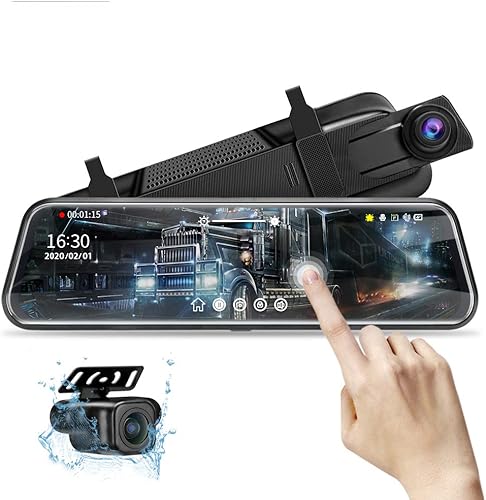
Jansite 10-Inch Mirror Dash Cam
Best for reversing help - 7
 Check it
KOUENOM CarPlay Mirror Dash Cam
Best for connected commutes - 8
 Check it
Jansite Upgraded 10-Inch Mirror Dash Cam
Best for long cable runs
How we chose mirror dash cams with backup cameras
We compared screen size, front and rear recording, camera coverage, included storage, controls and parking features to find a good fit for different drivers. The best choice is the one whose display and cameras suit your vehicle and driving needs.
Resolution is one useful factor, but it doesn't guarantee that every plate will be readable. Distance, glare, lighting, camera position and the angle of the lens all affect the image.
Check the parking feature separately from normal driving recording. Several models need an added hardwire kit for parking monitoring, so that feature may require extra parts and installation.
For installation planning, see our guide to where to mount a dash cam. If you're deciding between a mirror display and a separate camera screen, our mirror dash cam vs regular dash cam comparison explains the main differences.
| Product | Best for | Front and rear video | Screen | Included storage | Our score |
|---|---|---|---|---|---|
| WOLFBOX G840S Mirror Dash Cam | large vehicles | 4K front, 1080p rear | 12 in | 32GB card | 8.8 |
| WOLFBOX G850 PRO Mirror Dash Cam | driver alerts | 4K front, 1080p rear | 64GB card | 8.2 | |
| WOLFBOX G930 Mirror Dash Cam | compact cabins | 4K front, 1080p rear | 10 in | 64GB card | 8.0 |
| WOLFBOX G840H Mirror Dash Cam | voice control | 2.5K front, 1080p rear | 11.8 in | No SD card | 7.8 |
| VROAVIE 360 Mirror Dash Cam | side coverage | 128GB card | 7.1 | ||
| Jansite 10-Inch Mirror Dash Cam | reversing help | 1080p front and rear | 10 in | No SD card | 7.0 |
| KOUENOM CarPlay Mirror Dash Cam | connected commutes | 4K front, 1080p rear | 12 in | 64GB card | 6.8 |
| Jansite Upgraded 10-Inch Mirror Dash Cam | long cable runs | 1080p front and rear | 10 in | 6.7 |
Which mirror dash cam with a backup camera fits your needs?
The WOLFBOX G840S is the strongest all-around fit here for a large screen and 4K front video. The other picks make sense when you value a smaller display, extra alerts, phone integration, reversing help or more camera angles.
WOLFBOX G840S Mirror Dash Cam: Best for large vehicles
- 12-inch screen
- 4K front and 1080p rear recording
- GPS antenna and 32GB card included
- Parking monitoring needs a hardwire kit
A 12-inch screen, 4K front camera and included GPS antenna make this a strong fit if you want a large mirror display with front and rear recording.
Pros
- 4K front camera
- GPS antenna and 32GB card included
- Split-screen view
Cons
- Parking monitoring requires a hardwire kit
- Large screen may cover more of the factory mirror
The WOLFBOX G840S pairs a 12-inch display with 4K front and 1080p rear recording. The box includes an external GPS antenna and a 32GB card, so you can start with the supplied storage before deciding whether you need more.
Its 170-degree front lens and 140-degree rear lens offer broad views. Split-screen mode can show both camera feeds together, while the low-reflectivity screen, WDR and HDR are designed to help manage glare and changes in light.
Choose this model if you want a large live rear view and higher-resolution front recording in one mirror unit. Skip it if you prefer a smaller display or want parking monitoring without adding a hardwire kit.
WOLFBOX G850 PRO Mirror Dash Cam: Best for driver alerts
- 4K front and 1080p rear recording
- Voice control
- ADAS and blind spot alerts
- 64GB card included
Voice commands, driver alerts and a 64GB card suit drivers who want more built-in functions alongside front and rear recording.
Pros
- 12 voice commands
- 64GB card included
- ADAS and BSD alerts
Cons
- More alerts and controls to set up
- Parking monitoring details are not specified here
The WOLFBOX G850 PRO adds voice commands and driving alerts to 4K front and 1080p rear recording. It comes with a 64GB card and an external GPS antenna, and its 5.8GHz Wi-Fi works with the WOLFBOX app to download and share videos.
Its ADAS functions include forward collision, pedestrian collision, lane departure, lead vehicle start and distance monitoring alerts. The BSD system is designed to help monitor blind spots and give alerts, but you still need to check mirrors and surroundings when changing lanes.
Pick the G850 PRO if hands-free commands and driver alerts are features you'll use. Skip it if you prefer a simple camera without several alerts and settings to configure; for a more focused comparison, see WOLFBOX G840S vs G930.
WOLFBOX G930 Mirror Dash Cam: Best for compact cabins
- 10-inch screen
- 4K front and 1080p rear recording
- GPS antenna and 64GB card included
- Loop recording and G-sensor
The 10-inch screen offers 4K front and 1080p rear video in a smaller format, with GPS and a 64GB card included.
Pros
- Smaller 10-inch display
- GPS antenna and 64GB card included
- Screen adjusts between views
Cons
- Parking monitor needs a separate hardwire kit
- The camera cable may take extra routing work
The WOLFBOX G930 gives you 4K front and 1080p rear video on a 10-inch screen. Its smaller display may suit a cabin where a 12-inch unit would take up too much mirror space.
It includes a 64GB card and external GPS antenna. You can swipe between front and rear views or use split-screen, and loop recording clears older footage as the card fills while the G-sensor locks footage after a collision.
Choose the G930 if you want a 4K front camera but prefer a smaller display. Plan the rear camera cable route before installation, and compare screen size and functions in our WOLFBOX G930 vs G840S guide.
WOLFBOX G840H Mirror Dash Cam: Best for voice control
- 11.8-inch screen
- 2.5K front and 1080p rear recording
- Voice control and ADAS/BSD alerts
- SD card not included
Voice control and driver alerts pair with a nearly 12-inch display, while the front camera records at 2.5K rather than 4K.
Pros
- Voice control
- ADAS and BSD alerts
- 5.8GHz Wi-Fi
Cons
- SD card not included
- Parking monitor requires a separate hardwire kit
The WOLFBOX G840H pairs an 11.8-inch display with 2.5K front and 1080p rear video. Voice control and ADAS and BSD alerts give it some of the same convenience features as the G850 PRO, though its front resolution is lower than the 4K options.
It doesn't include an SD card, so plan to buy compatible storage before relying on it for recordings. WOLFBOX says parking monitoring requires a separate hardwire kit.
Choose the G840H if you want a large mirror display, voice control and alerts but don't need 4K front video. Skip it if you want a card included or prefer a simpler system; see the WOLFBOX G840S review if higher front resolution matters more.
VROAVIE 360 Mirror Dash Cam: Best for side coverage
- Front, rear and two side cameras
- 12-inch screen
- 128GB card included
- Parking modes need a separate hardwire kit
Four cameras record the front, rear and both sides for drivers who want more coverage than a front-and-rear mirror system.
Pros
- Four camera directions
- 128GB card included
- Wi-Fi and GPS module
Cons
- More cameras and cables to position
- Parking modes require an extra hardwire kit
The VROAVIE 360 is the only pick here with front, rear, left and right cameras. Its four 1080p channels and 12-inch screen suit drivers who want views beyond the road ahead and the area behind the vehicle.
It includes a GPS module, Wi-Fi and a 128GB memory card. Parking modes need a separately purchased hardwire kit, and each extra camera adds a mounting position and cable route to plan.
Choose it if side coverage is a priority, such as when you want more directions recorded around the vehicle. Skip it if a basic front and rear system meets your needs; a 3-channel dash cam may be a better fit if you want a cabin camera instead of side cameras.
Jansite 10-Inch Mirror Dash Cam: Best for reversing help
- 10-inch touch screen
- 1080p front and rear cameras
- Reverse assist lines
- SD card not included
A 10-inch screen, dual 1080p cameras and reverse assist lines fit drivers who mainly want a mirror display and a rear view while backing up.
Pros
- Reverse assist lines
- Touchscreen view adjustment
- Supports up to 128GB SD card
Cons
- SD card not included
- Parking monitoring needs a hardwire kit
The Jansite 10-Inch Mirror Dash Cam combines 1080p front and rear cameras with reverse assist lines. When you shift into reverse, the screen switches to the rear camera view with parking lines to help judge the space behind you.
The rear camera is described as waterproof, and the system supports an SD card up to 128GB, which you need to buy separately. Parking monitoring requires a Jansite hardwire kit.
Choose this model if you mainly want a mirror display and a more useful rear view while backing up. Before attaching it, check your original mirror's size and weight capacity, then confirm that the rear camera can be mounted where you need it.
KOUENOM CarPlay Mirror Dash Cam: Best for connected commutes
- 12-inch screen
- 4K front and 1080p rear recording
- CarPlay and Android Auto connection
- Parking monitoring requires a hardwire kit
CarPlay and Android Auto add phone functions to a mirror camera, alongside 4K front and 1080p rear recording.
Pros
- CarPlay and Android Auto connection
- 64GB card included
- Reverse assist
Cons
- Cannot be used as a standard rearview mirror
- Original mirror must be longer than 6.3 in
The KOUENOM CarPlay Mirror Dash Cam combines 4K front and 1080p rear recording with CarPlay and Android Auto. It connects to a phone through Bluetooth and includes a 64GB card.
Reverse assist, loop recording and a G-sensor add camera functions. The original mirror must be longer than 6.3 inches for stable mounting, and the unit cannot be used as a standard rearview mirror.
Choose this model if you want phone apps and camera views on the same display. Skip it if you need to use the screen as a conventional mirror when the camera view is off, or if your factory mirror is too short for its mounting requirement.
Jansite Upgraded 10-Inch Mirror Dash Cam: Best for long cable runs
- 10-inch touch screen
- 1080p front and rear cameras
- 19.6-foot rear camera cable
- SD card not included
The longer rear camera cable can help with routing through a larger vehicle, while dual 1080p cameras provide front and rear recording.
Pros
- 19.6-foot rear camera cable
- Automatic rear view when reversing
- Touch controls
Cons
- SD card not included
- Parking monitor needs an ACC hardwire kit
The Jansite Upgraded 10-Inch Mirror Dash Cam includes a 19.6-foot rear camera cable. That extra reach can help when routing through a longer cabin, though you should still map the route and measure before you attach the camera.
It records 1080p video from both cameras, and the rear image fills the screen when you shift into reverse. The rear camera has parking guidelines and is described as waterproof; the SD card is sold separately, and parking monitoring needs an ACC hardwire kit.
Choose this model when cable length and reversing view matter more than 4K front video. Skip it if you want GPS or an included memory card, which aren't among the listed features for this model.
How do you choose a mirror dash cam with a backup camera?
Start with the view you need, then check fit, wiring and storage. This order helps you avoid paying for features you won't use or discovering that the display or rear cable doesn't suit your vehicle.
Will the mirror screen fit your factory mirror?
Measure your factory mirror and compare it with the display dimensions and attachment method. A larger screen can cover more of the original mirror, so check the straps or mounting points and make sure the display won't interfere with your normal driving view.
The KOUENOM needs an original mirror longer than 6.3 inches for stable mounting. Its display also cannot serve as a conventional rearview mirror, so choose another model if you expect a reflective mirror when the screen is off.
Think about how much of your rear window you can see. The main reason to choose a streaming mirror is often that its rear camera can show a view that passengers, cargo or a vehicle's body would otherwise block.
Which rear camera position suits your vehicle?
Rear camera placement depends on the design and your vehicle. Some cameras mount outside near the rear of the vehicle, while others may be installed inside the back glass; check the camera's intended position and instructions before planning the route.
A camera mounted behind glass can be affected by tint, defroster lines, dirt or reflections. An outside camera may need a route through the body or hatch, so check whether the cable can reach and whether the mounting spot stays clear.
Keep the lens away from objects that block the view. Route the cable clear of airbags, pedals, hinges and other moving parts, and secure loose wire so it can't catch or rattle.
How much storage should you plan for?
Check whether a memory card is included and what capacity the camera supports. The G840S comes with 32GB, the G850 PRO, G930 and KOUENOM include 64GB, and the VROAVIE includes 128GB; the two Jansite models and G840H require a separate card.
Loop recording overwrites older saved footage as storage fills. If you need to keep a clip, lock it with the camera's controls and copy it to a phone or computer soon after the event.
A larger card can give you more room before older recordings cycle out, but confirm the camera's supported size before buying one. The G840H supports cards up to 256GB, while the Jansite 10-Inch lists support up to 128GB.
Do you need parking monitoring?
Parking monitoring is useful only if you can power and install it correctly. Several models need a separate hardwire kit for this feature, including the G840S, G840H, VROAVIE, Jansite 10-Inch and KOUENOM.
Check the kit requirements before you buy, and follow the camera and vehicle instructions for wiring. If you don't want to hardwire a camera, focus on its normal driving and reversing functions instead.
For another power option to consider, read our guide to dash cam battery packs. For day-to-day footage, how loop recording works explains why clips disappear as a card fills.
How do you set up a mirror dash cam and rear camera?
Set up the mirror display first, then position the rear camera and route its cable. A careful dry run helps you check the view and cable reach before securing anything in place.
1. Check the box and plan the route
Confirm that the kit includes what you expect, especially the memory card, GPS antenna, rear camera cable and any power accessories you need. The G840H and Jansite models don't include an SD card, and several parking modes require a separate hardwire kit.
Hold the mirror camera against your factory mirror to check the fit. Run the rear cable loosely along your planned path and make sure it reaches the chosen mounting position without stretching or crossing controls.
2. Attach the mirror camera and set the view
Use the supplied straps or mounting method described in the manual. Keep the unit stable, and check that it doesn't block your sightline or cover controls.
Turn on the display and adjust the front camera view so it points at the road ahead. If the camera has touch controls, use the display to select the front, rear or split-screen view that is easiest for you to read.
3. Mount and aim the rear camera
Place the rear camera where it has a clear view behind the vehicle. Follow the instructions for the specific camera, since a rear camera designed for an outside mount may not be suited to the inside of the rear glass.
If the camera can switch its image orientation, set it to match the mounting position. Check the view with the vehicle parked before driving, and adjust the angle until the image shows the area you need.
4. Secure the cable and check reversing
Route and secure the cable where it won't interfere with moving parts or vehicle safety systems. Keep it away from airbags and make sure it doesn't hang near pedals or obstruct the driver.
If your camera switches to the rear view in reverse, check that behavior while stationary and follow the manual's guidance for connecting the reverse signal. If the image includes parking lines, make sure they line up with the camera's actual view before relying on them.
5. Set recording and preserve clips
Insert the memory card, set the date and time, and check that loop recording is enabled. If the camera has a G-sensor or voice controls, learn how it locks a clip before you need to preserve footage.
Review a short recording to confirm that both camera views work and the image isn't upside down or obstructed. For help moving files later, see how to watch dash cam footage on a computer.
What common mirror dash cam buying mistakes should you avoid?
The most common mistakes are assuming every rear camera mounts the same way, overlooking card requirements and expecting parking mode to work without extra wiring. A few checks before buying can prevent a poor fit or a feature you can't use.
Don't choose by resolution alone. A 4K front camera may suit drivers who want more recorded detail, but a smaller screen, clearer rear view or easier installation may matter more for your vehicle.
Don't assume the display behaves like a regular mirror when turned off. That point matters for KOUENOM, which cannot be used as a standard rearview mirror; check the behavior you want before choosing any camera display.
Don't leave cable planning until after mounting the display. Measure the route to the rear camera, account for the vehicle's doors or hatch, and keep the wire away from moving parts and airbag areas.
Don't assume parking monitoring is included as a ready-to-use feature. Confirm the hardwire kit requirement and decide whether you're comfortable with the installation before making that feature part of your decision.
Don't expect loop recording to preserve every clip automatically. Locked footage is less likely to be overwritten, but copy important recordings to another device rather than leaving them on the camera indefinitely.
Which mirror dash cam with a backup camera should you buy?
Choose the WOLFBOX G840S for a large display, GPS and 4K front recording in a front and rear system. Pick the G930 if you want 4K front video on a 10-inch screen, the G850 PRO for voice commands and alerts, or the VROAVIE 360 when side camera coverage is your priority.
For a straightforward reversing view, consider either Jansite model and choose based on cable reach and the screen features you need. Before you buy, measure the mirror, plan the rear camera route and confirm the storage and parking power requirements.
Our top 3 picks at a glance
-
1
-
2
-
3
Frequently asked questions
Does a mirror dash cam with a backup camera record while driving?
Yes. These mirror dash cams pair a forward-facing camera with a rear camera, and most record both views while the car is moving.
The rear image can also appear on the mirror screen to show the view behind the vehicle.
Check whether the rear camera is intended for inside or outside mounting, and route its cable according to the manual.
Can a mirror dash cam replace the factory rearview mirror?
Most models in this roundup attach over the existing rearview mirror with straps or a mount. They add a screen and camera view, but do not remove the factory mirror.
The KOUENOM model cannot be used as a standard rearview mirror, so check how its display works when its camera view is off.
Do mirror dash cams need a hardwire kit for parking mode?
Several models need a separate hardwire kit for parking monitoring. The G840S, G840H, VROAVIE, Jansite 10-Inch and KOUENOM models specify an extra kit for this feature.
Confirm the kit fits the camera and your vehicle, and follow the vehicle and camera makers' installation instructions.
What should you check before installing a rear camera?
Check the camera's intended mounting position, cable length and routing path before you attach it. Rear cameras may mount inside the back glass or outside near the license plate, depending on the model.
Keep the camera view clear, secure the cable away from moving parts, and follow the maker's guidance for your vehicle.


