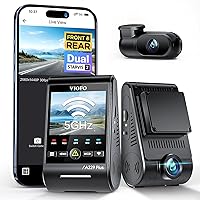
How to Connect a Dash Cam
To connect a dash cam, plug its power cable into the camera, run the wire around the windshield trim to a 12V socket or fuse tap, then start the car and confirm recording. Mount the camera on clean glass first so the cable length matches the final position.
On this page (8 sections)
- Where should the dash cam and cable go first?
- Which power source should you use?
- How do you run the cable out of sight?
- How do you hardwire a dash cam to the fuse box?
- How do you keep the cable tidy?
- How do you connect the camera and check it works?
- Which cable matters for a 2K or multi-channel camera?
- What should you check before driving away?
To connect a dash cam, plug the power cable into the camera, run the wire around the windshield trim to a 12V socket or a fuse tap, then start the car and check that it records. Mount the camera first so you can measure the cable run from its real position.
The job takes about 20 to 40 minutes with a socket cable and longer with a hardwire kit. Most of that time goes on routing the cable out of sight, not on the electrical part.
The sections below cover each step in order, from placement to a final recording check.
Where should the dash cam and cable go first?
Fit the camera to clean glass behind the rearview mirror before you run any cable. The mount position sets the cable length, so changing it later means redoing the routing.
Wipe the glass with a lint-free cloth and let it dry. Press the adhesive mount firmly for a few seconds, then leave it to bond before hanging the camera.
Our guide to where to mount a dash cam covers legal placement and wiper sweep limits in more detail.
With the camera in place, plan the cable path toward the nearest 12V socket or fuse box. A typical route goes up the windshield to the headliner, across to the A-pillar, down to the floor, then forward under the dash.
Add about 1 ft of slack at each end so the plugs aren't strained.
Check that the cable stays clear of airbags in the A-pillar. Follow the pillar's original wiring channel and never lay cable across an airbag cover.
Which power source should you use?
Use the 12V socket cable for driving-only recording, and a hardwire kit when you want parking mode. Each option changes how much work the connection takes and what the camera can do with the engine off.
A 12V socket adapter is the simplest choice. Plug it in, and the camera starts when the socket has power.
Many sockets cut off with the ignition, which is fine for a camera that only needs to record while driving.
A hardwire kit connects the camera to the fuse box for continuous power. It also enables parking surveillance and a low voltage cutoff, so the car battery isn't drained while parked.
That's the main reason people choose it over a socket cable.
USB ports in the car can work too, but many deliver low current or shut off when the engine stops. Check the camera's power requirement before relying on one.
How do you run the cable out of sight?
Tuck the cable behind the headliner and trim panels rather than letting it hang across the glass. A hidden run keeps the windshield clear and the camera looking factory-installed.
Start at the camera end. Push the cable under the front edge of the headliner with your fingers or a trim tool.
Work along the top of the windshield, then down the A-pillar trim toward the door seal.
Follow the seal down to the floor and run the cable under the sill trim or the floor mat edge. Cross to the center console or fuse box only where the cable won't catch a foot or a seat rail.
Leave a small service loop near the camera so the plug isn't pulled tight. Avoid running the cable over the steering column or near pedals.
Zip-tie any excess under the dash rather than coiling it in view.
Check the route after each panel. If the cable pinches or kinks, back up and try a wider gap before forcing it.
How do you hardwire a dash cam to the fuse box?
Connect the red battery wire to constant power, the yellow ACC wire to an ignition circuit and the black ground wire to bare metal. That order matches how the VIOFO HK4 switches between driving and parking mode.
Prepare two fuse taps for the hardwire cable. Pull the fuse for the circuit you're tapping, fit the tap in its place and insert the original fuse plus the camera fuse into the tap.
The VIOFO HK4 kit includes a full set of 8 circuit fuse taps.
Run the red wire to a circuit with power at all times. Run the yellow wire to a circuit that goes live only when the ignition is on.
Crimp or solder the joins, then cover them.
Ground the black wire to an unpainted metal point on the chassis. A painted or plastic surface won't give a reliable ground.
The HK4 cable runs 13.1 ft (4 m), which is usually enough to reach from the windshield to the fuse box.
Set the low voltage cutoff in the kit. The HK4 offers four cutoff values and stops powering the camera when the battery falls to that level.
VIOFO says the kit cuts power at 11.8V on a 12V system and 24.8V on a 24V system, protecting the battery from going flat while the car sits parked.
How do you keep the cable tidy?
Use adhesive clips on any stretch of cable that stays in view, and keep the rest behind trim. Loose cable near the mirror or along the dash looks untidy and can snag on things.
The KnotKing set gives you 60 small black clips for cords up to 0.22 in (5.6mm) in diameter. That size covers slim USB and dash cam cables; thicker extension cables won't fit.
Clean and dry the surface before sticking a clip down. Smooth plastic, glass and painted metal hold the adhesive well, while leather, rubber and textured or dusty surfaces don't.
Press each clip for about 3 seconds, and give heavier cables 24 hours before loading the clip.
Place clips every few inches along exposed runs. Don't put one where the cable bends sharply, since a tight clip can crease the wire.
Skip the clips if your whole cable run sits behind panels. They're there for the visible inches, not as a substitute for proper routing.
How do you connect the camera and check it works?
Plug the cable into the camera's power port, start the engine and watch for the recording light. A camera that powers on and starts recording without prompts is connected correctly.
Give the camera about 30 seconds to boot. Check that the screen or app shows a live view and that the record indicator is active.
Tap the record button if it doesn't start on its own.
Set the time and date in the menu so files are easy to find later. Then let it record for a minute or two and stop it.
Review the saved clip on the camera or by moving the memory card to a computer. A file that plays back confirms both power and storage are working.
For how the camera manages storage as the card fills, see what is loop recording on a dash cam.
If nothing happens, check the plug seating at both ends first. Then check the socket fuse and the camera's power rating.
Which cable matters for a 2K or multi-channel camera?
Match the cable to the camera's port and power draw, because higher-resolution and multi-channel cameras need more current. A thin charging cable that works for a phone can cause restarts or missed clips.
A 2K dash cam records more detail per frame and often draws more power than a basic 1080p model. Use the cable and adapter supplied with it, or one rated for the same current.
A cable that's too thin may cause the camera to reboot when it writes a file.
A 3 channel dash cam adds a rear and interior camera. Each extra camera has its own cable, so plan three runs before you start.
The rear cable is usually the longest and takes the most routing work.
Check each plug against its port before pushing it in. USB-C and mini-USB plugs look similar at a glance but won't seat in the wrong socket.
Label the cables at the camera end if you're fitting more than one.
For a multi-channel setup, power the main unit first and confirm it records before adding the extra cameras. That way a fault in one cable doesn't hide behind the others.
What should you check before driving away?
Confirm the camera records with the engine running and switches off or into parking mode when you stop. Those two behaviors cover normal driving and parked surveillance.
Start the engine and watch the camera boot. Then turn the engine off and see what happens: a socket cable setup should lose power, while a hardwired camera with ACC detection should switch to parking mode.
Check that no cable crosses an airbag, the pedals or a seat rail. Tug each plug gently to confirm it's seated.
Look at the route one more time in daylight so you can spot a cable hanging below the headliner.
Finally, review a saved clip from that drive. A clear view with the time stamp correct means the connection and the placement are both right.
For the best overall camera to pair with this setup, see our 2K dash cam picks.
Frequently asked questions
Can I plug a dash cam into a USB port in the car?
Yes, if the port delivers enough power and stays on while driving. Many car USB ports are low power or cut off with the ignition, so a 12V socket adapter or a hardwire kit is the safer choice for a camera that must run reliably.
Do I need a hardwire kit for a dash cam?
No. A 12V socket cable is enough for recording while you drive.
A hardwire kit is the right pick when you want parking surveillance with the engine off and protection against draining the battery.
How do I hide the dash cam cable in the car?
Tuck the cable behind the windshield headliner and down the A-pillar trim, then along the floor or under the dashboard to the power source. Use adhesive clips on exposed runs and trim tools to lift panels without scratching them.
How do I know the dash cam is connected properly?
Start the engine and watch the camera power on and begin recording without a prompt or error message. Then check that the files save to the memory card and that the time and date are correct.
Is it safe to hardwire a dash cam to the car battery?
Yes, when the kit includes low voltage protection and you connect the battery wire to constant power and the ACC wire to an ignition circuit. The kit should stop powering the camera before the battery drops too far to start the engine.