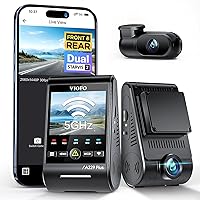
Does a Dash Cam Record Audio Inside the Car?
Yes, most dash cams record audio inside the car, and many ship with the microphone turned on by default. The mic picks up conversations, phone calls, and road noise, and you can usually mute it in the settings or with a button.
On this page (8 sections)
- How does a dash cam record audio inside the car?
- Does every dash cam record audio?
- How do you turn the dash cam microphone on or off?
- Is it legal to record audio in your car?
- Should you leave audio on or mute it?
- Which dash cams handle audio well?
- What else should you know about dash cam audio?
- The bottom line on does a dash cam record audio inside the car
Yes, most dash cams record audio inside the car, and many arrive with the microphone already on. The mic captures conversations, phone calls, and road noise along with the video.
You can usually turn it off in the settings or with a button, so the question is less whether a dash cam records audio and more whether you want it to.
Audio is a separate track from the picture. That matters because you can keep the video rolling while the sound stays private.
Here's how the mic works, when to mute it, and what to check before you record passengers.
How does a dash cam record audio inside the car?
A small built-in microphone captures sound and stores it as an audio track alongside each video clip. The mic usually sits on the camera body or near the interior lens.
It records whatever reaches it: voices in the front seats, a phone call on speaker, the radio, turn signals, and traffic outside.
The audio is saved with the video file, not as a separate recording you manage on its own. When you pull a clip to review a crash or a near miss, the sound comes with it.
Most cameras use a simple on or off setting rather than adjustable volume. Some let you keep video running while the mic is muted.
A few three-channel models treat the interior camera's audio separately from the front camera's. If you're new to the hardware, our guide to what a dash cam is and how it works covers the recording basics first.
Does every dash cam record audio?
No, not every model records sound. Audio is common, but it isn't universal.
Some budget cameras leave out the microphone to cut cost.
Others include one but ship with it muted. A camera built for fleet or commercial use may record video only by design.
Before you buy, check whether the model lists a microphone or audio recording in its features. If sound matters to you, confirm it before ordering.
If privacy matters more, a video-only camera removes the risk of forgetting to mute. A camera without a mic can't accidentally capture a private call.
That's worth knowing if you often drive with clients or family in the car and would rather not think about it. For a broader look at whether the hardware is worth it at all, see do you need a dash cam.
How do you turn the dash cam microphone on or off?
Open the camera's settings menu or app and find the audio or microphone toggle. On most models the switch sits in the recording settings.
Press it once and the mic mutes; the video keeps recording without sound.
Some cameras also put a mic button on the body, so you can mute mid-drive without opening the app.
A few models tie audio to voice control. If voice commands are on, the mic has to stay live to hear you.
That means turning off audio may also disable hands-free commands. Decide which you value more before you change the setting.
Check the audio state at the start of each trip if passengers will be in the car. The setting usually stays where you left it, but a firmware update or a reset can switch it back.
After any update, confirm the mic is still where you want it.
Is it legal to record audio in your car?
It depends on where you drive, and the safest approach is to know your local rule before you record. Many US states follow a one-party consent rule, which means you can record a conversation you're part of.
Since you're in the car, that usually covers your own recording.
Some states require everyone in the conversation to agree, which includes your passengers. A few have stricter rules for recording that could catch a private talk.
Laws also differ by country, and they can change. This isn't legal advice, so check your state or national rule, or ask a lawyer if you record passengers regularly.
If the rule where you drive requires consent, tell people they're being recorded or mute the mic when they get in. Keeping the audio off in a rideshare or taxi is the simplest way to avoid the issue.
Video without sound still gives you the crash evidence most people actually want.
Should you leave audio on or mute it?
Mute the mic if privacy matters more than the extra evidence. The main reason to keep audio is context: a horn, screeching brakes, or the timing of an impact can back up the video.
In a dispute, that sound can help show what happened and when.
The reasons to mute are just as practical. Audio captures phone calls, private talks, and anything said in the heat of the moment.
If a clip ends up shared with an insurer, a lawyer, or the police, the sound goes with it. A heated argument caught on tape can complicate a claim that the video alone would settle cleanly.
Many drivers keep audio on for solo commutes and mute it when passengers are aboard. That gives you the crash context when you're alone and privacy when it counts.
The mute button is there for a reason, so use it when the situation calls for it.
Which dash cams handle audio well?
Look for a model with a clear audio toggle and an interior camera that records the cabin. An interior lens is useful if you want sound and video of passengers, such as for rideshare driving.
Here are three cameras that record the cabin and give you control over the mic.
70mai 4K 3-Channel Dash Cam
The 70mai records 4K in front, 1080P inside, and 1080P behind. Its interior camera has switchable infrared, so it can capture the cabin at night.
That makes it a fit for rideshare drivers who want both sound and a clear view of passengers. The mic records audio with the video, and you can manage settings in the app.
A 64GB card comes in the box and it supports up to 512GB. It uses a super capacitor, which suits hot and cold climates better than a battery.
Our comparison of supercapacitor vs battery dash cams explains why that matters in summer heat.
Vantrue N4 Pro S
The Vantrue N4 Pro S records 4K in front, 2.5K in the rear, and 1080P inside on three STARVIS 2 sensors. Its rear camera rotates 360 degrees, so you can aim it at the cabin or the trunk.
Voice control lets you take a photo or start recording hands-free, though the mic stays live for those commands. It supports up to 1TB of storage and uses a super capacitor.
The card is sold separately. This is the camera to pick if you want the sharpest interior footage to go with the audio.
IIWEY N5 PRO 4-Channel Dash Cam
The IIWEY N5 PRO covers 4K in front and 1080P on its other three channels, with side cameras for a wider view. WiFi 6 and 5GHz support make clips faster to download to your phone.
It includes a 128GB card. With four cameras, it's the option for drivers who want the cabin and the sides covered at once.
Audio records with the video and you manage it in the app. The parking mode needs a separate hardwire kit.
If you're weighing resolution across models, see our guide to 1080p vs 4K dash cams.
What else should you know about dash cam audio?
Audio files are usually small, so they don't shorten your recording time much. The card fills up from video long before sound becomes the limit.
Loop recording overwrites the oldest clips, audio included, so set the emergency lock when something matters.
Audio quality depends on distance and background noise. The mic picks up the front seats best, and sound from the back row arrives softer.
An open window or loud music can drown out voices. Treat the audio as a helpful extra, not a courtroom recording.
Some cameras let you mute only the interior mic while the front mic stays on. That's a good middle ground if you want road sound but not cabin talk.
Check which option your model offers.
Before a trip with passengers, glance at the audio setting. It's one button, and it prevents an awkward surprise later.
For the bigger picture on choosing hardware, our dash cam buying guide walks through what to look for.
The bottom line on does a dash cam record audio inside the car
Yes, most dash cams record audio inside the car, and the mic is often on out of the box. Whether you keep it on is your call.
Leave audio on for solo driving where a horn or impact might help a claim.
Mute it when passengers, clients, or private calls are in the car, or when the law where you drive requires consent. Check your state's rule if you're unsure.
For most drivers, the practical setup is a camera with an easy mute control and an interior lens for cabin video. The 70mai 4K 3-Channel is the pick for rideshare night driving, thanks to its infrared interior camera.
The Vantrue N4 Pro S wins on interior sharpness. The IIWEY N5 PRO suits drivers who want four-channel coverage.
Pick the one that matches how you drive, and set the mic before your next trip.
Frequently asked questions
Is it legal to record audio in my own car?
Rules vary by state and country. Many places allow recording where at least one person in the conversation consents, which covers you recording your own car.
Others require everyone's consent, so check your local law before recording passengers.
Do dash cams record audio when the car is parked?
Only if parking mode is active and the camera has power, usually through a hardwire kit. Audio capture in parking mode depends on the model's settings.
Check what your camera records before leaving it running overnight.
Does audio help in a crash claim?
It can. Sound can back up the timing of an impact, a horn, or screeching brakes.
Treat audio as supporting evidence only; the video usually carries more weight with insurers and police.